# Garuda Defi

<figure><img src="https://1287123956-files.gitbook.io/~/files/v0/b/gitbook-x-prod.appspot.com/o/spaces%2FtxjjcjzH1UYRlroVNUWJ%2Fuploads%2F5858ofD3sSABJKKXtjWg%2FBlue%20Futuristic%20Business%20Roadmap%20Presentation%20-%202025-02-20T222558.258.png?alt=media&amp;token=e7b39858-d265-4613-b479-24e6993be9be" alt=""><figcaption></figcaption></figure>

## What is Garuda-Defi?

Garuda-Defi is an automated market maker (AMM) built on Terra Classic (LUNC) blockchain which enables permissionless DeFI features and on-chain order book created by Garuda Universe Validator.&#x20;

Garuda DeFi offers a few key advantages :&#x20;

* **Faster and cheaper**: Garuda DeFi leverages the efficiency of the LUNC blockchain to achieve transactions magnitudes faster than Ethereum and gas fees which are a fraction of the cost.
* **Permissionless DeFI features:** Any user or project can create permissionless trading pools, factory token, staking contracts, launchpads, P2P (Peer to peer) and many DeFI features.
* **On-chain order book :** Allows the traders to enter the market with the target price set by limit orders using smart contracts.

## What can I do in Garuda DeFi ?

&#x20;[**Trade and swap**](/products/swap) **:** Swap feature allows any two tokens to be exchanged quickly within liquidity pools or based on on-chain order book.

&#x20;[**Create a pool**](/products/factory-pool) : Create a pool for any asset in just a few clicks. Once live, your pool will be tradeable through Garuda DeFi's routing.

&#x20;[**Provide liquidity**](/products/liquidity-provider)**:** Help projects bootstrap liquidity and earn trading fees for each swap going through that pool.

**Create staking contract, stake and earn** : Create staking pool contract for your own token, stake and earn rewards for any token registered in Garuda DeFi platforms.

**Create CW-20 Token** : Create CW-20 token on Garuda DeFi factory token in just a few clicks.

🔜 **Create and participated in launchpad** : Create fund raise and gain visibility for your project or participate in the secure & fair launchpad with benefits buy at discount price before bonding in public launch.

🔜 **Create and trade in P2P** : Transact directly with each other (Peer to peer) in a trustless and decentralized environment.

## Links

[Website](https://garuda-defi.org/) I [Twitter](https://x.com/GarudaUniverse) I [Telegram](https://t.me/GNValidator) I [Discord](https://discord.com/invite/vU8n9G2ahQ)&#x20;


# Audit

To ensure Dapps security, Garuda DeFi has been KYC and audit by trustable security company [Solidproof](https://solidproof.io/). &#x20;

## KYC&#x20;

The identity and authenticity of Garuda DeFi company and individual team already verified by Solidproof that enable businesses to meet regulatory requirements and establish a secure and compliant environment.&#x20;

{% embed url="<https://app.solidproof.io/projects/garuda-defi>" %}
KYC Tier GOLD
{% endembed %}

## Smart Contract Audit

Garuda DeFi smart contract has been passed through comprehensive security audits and testing. Resulting trust score in 100.00 .&#x20;

The smart contract that has been audit are :&#x20;

* Pair factory
* Pair-base program
* CW-20 base program

{% embed url="<https://app.solidproof.io/projects/garuda-defi>" %}
Smart Contract Audit
{% endembed %}


# Products

Our current list of products :&#x20;

{% content-ref url="/pages/ICJ8yUIAAdJWOrB0kSw0" %}
[Swap](/products/swap)
{% endcontent-ref %}

{% content-ref url="/pages/Psuue1JGD4ldiECrFF9i" %}
[Liquidity Provider](/products/liquidity-provider)
{% endcontent-ref %}

{% content-ref url="/pages/CSWjFYt7ZBlP54NWYSzF" %}
[Factory Token](/products/factory-token)
{% endcontent-ref %}

{% content-ref url="/pages/NEhE1TH1s9QnMdDuJ9oQ" %}
[Factory Pool](/products/factory-pool)
{% endcontent-ref %}

{% content-ref url="/pages/I4CTuuI9XWadkJSKXFFP" %}
[Earning](/products/earning)
{% endcontent-ref %}

{% content-ref url="/pages/IN9QFB3jE2n6pZD9q3bM" %}
[GDEX Token](/products/gdex-token)
{% endcontent-ref %}

{% content-ref url="/pages/CDsFnm84X4Uv0wbdD5uu" %}
[Factory Farming](/products/factory-farming)
{% endcontent-ref %}

{% content-ref url="/pages/zZf3TcCXSliM9Rs4ymy5" %}
[P2P](/products/p2p)
{% endcontent-ref %}

{% content-ref url="/pages/IhsKiujncdmKRscJajA3" %}
[Trader Profile](/products/trader-profile)
{% endcontent-ref %}

{% content-ref url="/pages/DZuFNKzeSWYF7WB13W9m" %}
[Airdrop Dapps](/products/airdrop-dapps)
{% endcontent-ref %}


# Swap

## Constant Product Market Maker

Garuda DeFi Swap using **Constant Product Market Maker**. It maintains a constant product of the quantities of two tokens in a liquidity pool. The formula is:&#x20;

**x \* y = k**

where x and y are the quantities of the two tokens, and k is a constant. As users trade tokens, the quantities x and y change, but the product k remains constant.&#x20;

This ensures that prices adjust automatically based on supply and demand.

## Trading Fees

In Garuda DeFI, trading fees are set to 0.5% \* ( 0.2% for Liquidity providers and 0.3% for [GDEX Shares](/products/gdex-token) )  for each trade which will be deducted from the transaction of the asset received by the trader.

| Trading Fees        | 0.5% |
| ------------------- | ---- |
| Liquidity Providers | 0.2% |
| GDEX Shares         | 0.3% |

{% hint style="info" %}
Trading fess are change-able with governance protocols
{% endhint %}

## How to Swap ?

There are 2 type of swap in Garuda DeFi :&#x20;

1. **Pool-to-pool swap,** heads up to <https://garuda-defi.org/swap> this will allow user to swap quickly within liquidity pools or based on the route from the registered pair in Garuda DeFi.

<figure><img src="https://1287123956-files.gitbook.io/~/files/v0/b/gitbook-x-prod.appspot.com/o/spaces%2FtxjjcjzH1UYRlroVNUWJ%2Fuploads%2FMXH3XMn4oexawR1idOhU%2Fphoto_2025-02-24_23-05-03.jpg?alt=media&amp;token=5cba70f6-95fe-4ff3-9b5b-43b2a0f8483d" alt=""><figcaption><p>Pool-to-pool swap</p></figcaption></figure>

2. **Pool swap,** swap from registered pool on Garuda DeFi  <https://garuda-defi.org/market> with trading graphic and transaction history information.

<figure><img src="https://1287123956-files.gitbook.io/~/files/v0/b/gitbook-x-prod.appspot.com/o/spaces%2FtxjjcjzH1UYRlroVNUWJ%2Fuploads%2FneIxJDINPsdVGzNznCKs%2Fphoto_2025-02-25_00-06-58.jpg?alt=media&amp;token=30a517eb-fff2-4348-808d-0c4f307bcc2e" alt=""><figcaption><p>Pool swap</p></figcaption></figure>


# Garuda Smart Route

Everything you need to know about Garuda smart route engine

## Smart Route

<figure><img src="https://1287123956-files.gitbook.io/~/files/v0/b/gitbook-x-prod.appspot.com/o/spaces%2FtxjjcjzH1UYRlroVNUWJ%2Fuploads%2FjkEDTIv1WeA9CylXFkT9%2Fphoto_2026-05-27_18-44-08.jpg?alt=media&amp;token=f7955986-3001-438b-bb2c-47b43c6cd2b6" alt=""><figcaption></figcaption></figure>

Garuda Smart Route is an optional routing engine designed to optimize trade execution by dynamically searching for the most efficient execution path across available liquidity sources within the Garuda DeFi ecosystem and supported external DEXs.

When it activated, Smart Route will evaluate and compare execution outcomes from multiple liquidity sources, including:

#### 1. Internal Pair Routing (Multi-Hop)

Smart Route can search across available trading pairs on Garuda DeFi using multi-hop routing, supporting different route paths.

Examples:

* Direct Pair: `TOKENA → TOKENB`
* Multi-Hop: `TOKENA → TOKENX → TOKENB`

The routing engine automatically selects the route estimated to provide the most favorable execution outcome.

#### 2. Orderbook Matching

Smart Route can source liquidity from the Garuda Orderbook by estimating available matching orders to improve execution pricing when sufficient liquidity exists.

#### 3. External DEX Aggregation

Smart Route can aggregate liquidity from supported external DEXs, including:

* Terraswap
* Terraport

This allows traders to access a broader liquidity landscape beyond Garuda native pools.

### External Aggregation Fee

Transactions utilizing external DEX aggregation incur a 0.1% fee based on the offer asset amount.

Fee distribution:

* 50% → Protocol Fees (distributed to GDEX Shares)
* 50% → Garuda Development Fund

## ⚠️ Important Notes & Disclaimer

#### Trading Tax Disclaimer

* Quoted results may not always represent the final best execution price.
* Certain CW20 tokens implement transfer taxes or trading taxes, which may not be fully reflected within routing estimations.
* Traders are strongly encouraged to review and verify swap outcomes before confirming transactions.

#### Orderbook Estimation Behavior

* Orderbook estimates may not appear when the requested ask amount exceeds available orderbook liquidity.
* However, transactions can still be successfully executed if Smart Route determines that a direct liquidity pair route provides a viable execution path.
* In such cases, execution may utilize Garuda’s [Shared Price Improvement](/products/on-chain-order-book#shared-price-improvement) mechanism to optimize trade outcome.


# On-chain Order Book

## On-Chain Orderbook

<figure><img src="https://1287123956-files.gitbook.io/~/files/v0/b/gitbook-x-prod.appspot.com/o/spaces%2FtxjjcjzH1UYRlroVNUWJ%2Fuploads%2FfTgoKX8mvPqO8XlZ4VJZ%2Fphoto_2026-05-27_18-40-14.jpg?alt=media&amp;token=ac7ac672-f20f-4d22-bc49-37afba326358" alt=""><figcaption></figcaption></figure>

Garuda DeFi introduces a fully on-chain orderbook trading system, bringing a familiar CEX-style trading experience into decentralized finance.

Traders can place Buy or Sell orders at specific limit prices, allowing greater precision and advanced trading strategies beyond traditional AMM swaps.

Unlike centralized exchanges (CEX), all orderbook activities on Garuda DeFi are executed entirely on-chain, meaning every action is subject to:

* Blockchain gas fees
* LUNC chain tax fees
* Standard network execution rules

### Terminology

To simplify terminology within Garuda DeFi, there are 2 parties involved in orderbook :

#### Maker

A Maker is a trader who creates and lists an order on the orderbook.

Examples:

* Creating a Buy Limit Order
* Creating a Sell Limit Order

Makers provide liquidity to the orderbook ecosystem.

#### Taker

A Taker is a trader who triggers an order execution by filling existing liquidity.

Execution may occur through:

* Smart Route execution
* Direct orderbook matching

Takers consume liquidity from available orders.

## Order Execution Mechanism

Maker orders can be executed (**filled**) under the following conditions:

### 1. Instant Fill Execution

Orders may be executed immediately upon creation when their pricing crosses the current market price.

Conditions:

* Sell Order below market price → Instant execution
* Buy Order above market price → Instant execution

Examples:

**Market Price:** `100`

* Sell Order at `95` → Filled instantly
* Buy Order at `105` → Filled instantly

This behavior mirrors traditional exchange matching engines.

### 2. Orderbook Matching

Orders can also be executed through matching between available orderbook liquidity.

Execution may occur via:

* **Smart Route Triggered Matching**, A taker transaction executed through [Garuda Smart Route](/products/garuda-smart-route) may trigger orderbook liquidity when it provides a favorable execution route.
* **Direct Orderbook Matching**, Execution can also occur directly between compatible buy and sell orders within the orderbook.

## Market Price Behavior

Due to the execution logic above, an order may remain listed even after the market price has moved beyond the target price.

This occurs because orderbook execution depends on actual matching conditions, not solely on market price movement.

An order can still be filled later through:

* Matching with another orderbook order
* Smart Route execution
* Future liquidity interactions

## Orderbook Fees

Successful order executions incur a 0.3% execution fee per completed order.

Fee allocation:

* 50% → Protocol Fees (GDEX Shares)
* 50% → Garuda Development Fund

Fees apply only to successfully executed orders.

## Shared Price Improvement

Garuda DeFi introduces a unique execution model called Shared Price Improvement.

When an orderbook execution results in a favorable price difference during matching or routing, the improvement value is shared between both trading participants.

Distribution:

* 50% → Maker Reward
* 50% → Taker Reward

#### Purpose

This mechanism is designed to:

* Reward Makers for providing orderbook liquidity
* Incentivize Takers for executing and triggering liquidity utilization
* Improve overall orderbook efficiency

## Order Management

A simple interface for managing your on-chain orderbook activity efficiently.

Users can easily monitor, track, and manage their orders in real time.

### My Orders

The **My Orders** tab displays all currently active orders.

<figure><img src="https://1287123956-files.gitbook.io/~/files/v0/b/gitbook-x-prod.appspot.com/o/spaces%2FtxjjcjzH1UYRlroVNUWJ%2Fuploads%2F4NU5nH0NnctalqiXO3dM%2Fphoto_2026-05-28_18-29-29.jpg?alt=media&amp;token=724dbbaf-f780-47ef-81b2-264ed378c5f2" alt=""><figcaption></figcaption></figure>

Features include:

* View open order status
* Monitor order details and market pairs
* Track price, offer amount, and filled progress
* Cancel orders instantly with a single action
* Bulk management with **Cancel All** support

Designed for fast and seamless order control directly on-chain.

### My History

The **My History** tab provides a complete record of past order activity.

<figure><img src="https://1287123956-files.gitbook.io/~/files/v0/b/gitbook-x-prod.appspot.com/o/spaces%2FtxjjcjzH1UYRlroVNUWJ%2Fuploads%2Fh5kkziEV3TuIiXoQHO4x%2Fphoto_2026-05-28_18-29-33.jpg?alt=media&amp;token=bb609ba1-1434-4c80-a09e-5803a240d0d1" alt=""><figcaption></figcaption></figure>

Users can review:

* Filled orders
* Cancelled orders
* Trade side (Buy / Sell)
* Execution price
* Transaction status
* Historical market activity

This allows traders to maintain clear visibility over previous executions and trading performance.


# Liquidity Provider

## Providing Constant Product Liquidity

Garuda DeFi allow anyone to provide liquidity by adding their assets to the pool listed.

## How to add liquidity to a pool :

1. Go to the " Swap" Page <https://garuda-defi.org/swap>
2. On the Swap Tab, click the **“Provide”** button&#x20;
3. Choose the pool that you want to add to the liquidity, enter an amount on the first section, the other will be calculated and filled in automatically ( you must have the amount of both tokens in your wallet ).
4. Make sure you have enough $LUNC to pay the gas fees and click "**Confirm Provide**".
5. You will see your new liquidity position on the Trade section.

<figure><img src="https://1287123956-files.gitbook.io/~/files/v0/b/gitbook-x-prod.appspot.com/o/spaces%2FtxjjcjzH1UYRlroVNUWJ%2Fuploads%2F6LZ15Y8MsZDqCojrEffa%2Fphoto_2025-02-20_22-43-37.jpg?alt=media&amp;token=afb66f06-e387-426a-b4c0-9e9416bd39e5" alt=""><figcaption><p>Provide Liquidity</p></figcaption></figure>

## **Liquidity pool explanation:**

When you add to a pool you will receive **Liquidity Provider tokens (LP tokens)**. For example, if a user deposited $GRDX and $LUNC into a pool, you would receive GRDX-LUNC ULP tokens.

These tokens represent a proportional share of the pooled assets, allowing a user to reclaim their funds at any point.

Every time a user swaps between $GRDX and $LUNC, a 0.50% fee is taken on the trade. 0.20% of that trade goes back to the LP pool.&#x20;

* Previously, if there were 100 ULP tokens representing 100 LUNC and 100 GRDX, each token would be worth 1 LUNC & 1 GRDX.
* If one user trades 10 LUNC for 10 GRDX and another traded 10 GRDX for 10 LUNC, then there would now be 100.020 LUNC and 100.020 GRDX.
* This means each LP token would be worth 1.00020 LUNC and 1.00020 GRDX now when it is now withdrawn.

## Withdraw/Remove Liquidity

1. Go to the "**Swap**" page <https://garuda-defi.org/swap>
2. On the Swap tab, click the **“Withdraw”** button in
3. Enter the amount of LP tokens you want to withdraw. The both token for each pair will be calculated and filled in automatically
4. Make sure you have enough $LUNC to pay the gas fees and click "**Confirm Withdraw**".

<figure><img src="https://1287123956-files.gitbook.io/~/files/v0/b/gitbook-x-prod.appspot.com/o/spaces%2FtxjjcjzH1UYRlroVNUWJ%2Fuploads%2FpLU4N2rZqeL3GCusBkx6%2Fphoto_2025-02-26_08-56-05.jpg?alt=media&amp;token=958fef0c-d286-4d8a-be4a-2d4d4a7a2306" alt=""><figcaption><p>Withdraw LP</p></figcaption></figure>


# Factory Token

Factory token allow anyone to create a CW-20 token on Garuda DeFi by permissionless .

## **How to Create a CW-20 Token?**

1. On Garuda DeFi home, click more and find token factory or go in [this page ](https://garuda-defi.org/tokenfactory)
2. Click next on CW-20 token ( *9788 CW20 base is a standard fungible tokens in Cosmos ecosystem*)
3. FIl the token information :  Name, symbol/ticker and decimals (*typically 6 for cosmos ecosystem*)

<div><figure><img src="https://1287123956-files.gitbook.io/~/files/v0/b/gitbook-x-prod.appspot.com/o/spaces%2FtxjjcjzH1UYRlroVNUWJ%2Fuploads%2FO3HC2zOnpyI3rKPMp9Br%2Fphoto_2025-04-04_14-53-28.jpg?alt=media&amp;token=8ce38e46-194c-4dff-81a6-76a05c7778ae" alt=""><figcaption><p>Token Factory in home page</p></figcaption></figure> <figure><img src="https://1287123956-files.gitbook.io/~/files/v0/b/gitbook-x-prod.appspot.com/o/spaces%2FtxjjcjzH1UYRlroVNUWJ%2Fuploads%2F6poi9iVNNPzhm8hGQLcn%2Fphoto_2025-04-04_15-03-06.jpg?alt=media&amp;token=47a03401-2b4c-43f9-a605-1324d6f275f8" alt=""><figcaption><p>9788 CW20 Base</p></figcaption></figure> <figure><img src="https://1287123956-files.gitbook.io/~/files/v0/b/gitbook-x-prod.appspot.com/o/spaces%2FtxjjcjzH1UYRlroVNUWJ%2Fuploads%2FyKrtOeJCsM4sysLnCj5x%2Fphoto_2025-04-04_15-04-02.jpg?alt=media&amp;token=8faaed1d-2da7-4d9f-acfe-c7312b76afc2" alt=""><figcaption><p>Basic token information</p></figcaption></figure></div>

4. Provide address wallet and amount token for initial token distribution.&#x20;
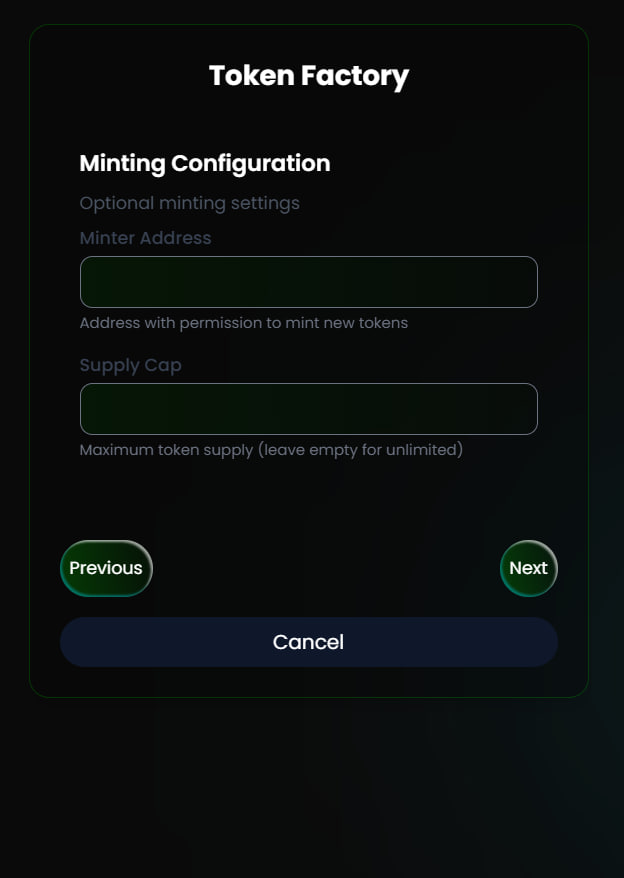
5. **Optional** - provide address that have authority to minting new token and maximum supply (*You may skip this step if don't have plan to mint new token*)
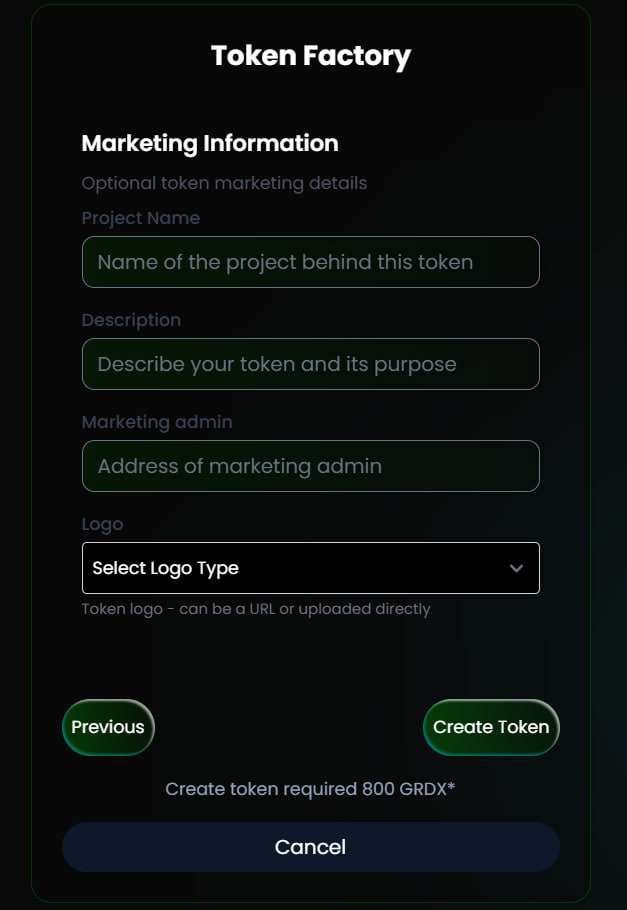
6. **Optional** - provide project name, description, marketing address and logo (*You may skip this step and focus with token logo URL*) and click create token.

{% hint style="info" %}
Fee token factory = 800 GRDX. 50% for development, 50% for burn fees.
{% endhint %}

<div><figure><img src="https://1287123956-files.gitbook.io/~/files/v0/b/gitbook-x-prod.appspot.com/o/spaces%2FtxjjcjzH1UYRlroVNUWJ%2Fuploads%2FsdD98L7Z0EblQPJsgerX%2Fphoto_2025-04-04_15-09-21.jpg?alt=media&amp;token=9f87a487-5072-4e4c-a822-92ebeeeaa763" alt=""><figcaption><p>Initial Distribution</p></figcaption></figure> <figure><img src="https://1287123956-files.gitbook.io/~/files/v0/b/gitbook-x-prod.appspot.com/o/spaces%2FtxjjcjzH1UYRlroVNUWJ%2Fuploads%2FvyeaZA96d2bK5uWiqx9l%2Fphoto_2025-04-04_15-09-30.jpg?alt=media&amp;token=10618316-5818-441a-b1a9-0e76eed447f7" alt=""><figcaption><p>Minting configuration - oprional</p></figcaption></figure> <figure><img src="https://1287123956-files.gitbook.io/~/files/v0/b/gitbook-x-prod.appspot.com/o/spaces%2FtxjjcjzH1UYRlroVNUWJ%2Fuploads%2FSLUHlnJzaLNqa1lIi57x%2Fphoto_2025-04-04_15-09-37.jpg?alt=media&amp;token=272d8124-417c-4201-aa5a-4b2fba7e15b6" alt=""><figcaption><p>Marketing Info and Logo</p></figcaption></figure></div>

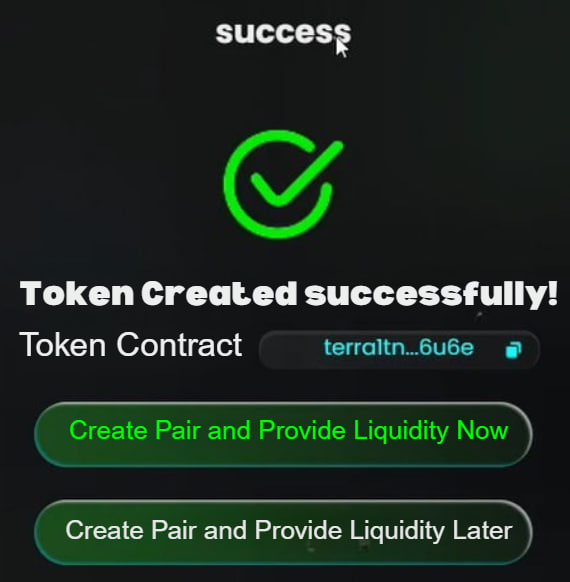
After created token you will have option to [create pair](/products/factory-pool) and [provide initial liquidity](/products/factory-pool#how-to-provide-initial-liquidity) now or later. &#x20;

<figure><img src="https://1287123956-files.gitbook.io/~/files/v0/b/gitbook-x-prod.appspot.com/o/spaces%2FtxjjcjzH1UYRlroVNUWJ%2Fuploads%2Fdk2Oox1xFuQd98pNiJmh%2Fphoto_2025-04-04_15-27-06.jpg?alt=media&amp;token=73b03b27-62a1-4f4c-be3c-f3531a060fab" alt=""><figcaption></figcaption></figure>

## How to Edit Token Info?

Edit token info only can be done if the token already have pair also allowed only for token owner\* and Garuda DeFi admin.&#x20;

{% hint style="info" %}
*If you don't have the authority to edit token info please contact us in* [*here*](https://t.me/Garudaverse99/141257)
{% endhint %}

1. Go to pair page, wheres the token located and click the update logo
2. Fill the info and click update token

<div><figure><img src="https://1287123956-files.gitbook.io/~/files/v0/b/gitbook-x-prod.appspot.com/o/spaces%2FtxjjcjzH1UYRlroVNUWJ%2Fuploads%2FW8v9tsSyTPsoZIYcSbMU%2Fphoto_2025-04-04_15-51-39.jpg?alt=media&amp;token=43ae60c4-9e30-4b8a-886e-e8d7e344f056" alt=""><figcaption><p>Click update logo</p></figcaption></figure> <figure><img src="https://1287123956-files.gitbook.io/~/files/v0/b/gitbook-x-prod.appspot.com/o/spaces%2FtxjjcjzH1UYRlroVNUWJ%2Fuploads%2FZmW2IV5xFDVpG2iSSpGa%2Fphoto_2025-04-04_15-51-45.jpg?alt=media&amp;token=600e2160-29e8-43c6-8664-cdbc48ad87cd" alt=""><figcaption><p>Update token information</p></figcaption></figure></div>


# Factory Pool

Factory pool allow anyone to create a liquidity pool on Garuda DeFi by permissionless .

It is ***highly*** suggested you carefully read and understand this ***entire*** guide before creating a pool.

* When a new pool is created, a small fraction of the initial liquidity is transferred to the pool vaults instead of being minted as LP tokens to ensure the liquidity pool is never empty and new liquidity positions can be added.
* LP tokens can be burned, which effectively transfers the underlying assets & trading fees to the pool.

## **How to Create a Permissionless Pool**

1. On Garuda DeFi [market pool](https://garuda-defi.org/market), click the button "**Create Pool**"&#x20;

<figure><img src="https://1287123956-files.gitbook.io/~/files/v0/b/gitbook-x-prod.appspot.com/o/spaces%2FtxjjcjzH1UYRlroVNUWJ%2Fuploads%2FPbeMzxFUDih6UPMge2qd%2Fphoto_2025-02-24_22-46-31.jpg?alt=media&amp;token=333b2f13-439e-4c79-9397-0a82563d5e95" alt=""><figcaption></figcaption></figure>

2. Set the base and quot assets for your pool.  If your token already registered on Garuda DeFi, you can select them from the list.&#x20;

* **Base assets**, your cw 20 token or any native token that you want to use as base token
* **Quot assets**, any native or CW20 token as your price references

2. Use token address to import your unregistered token by paste the CA (Contract Address)
3. Click create pool, approve the transaction on your wallet and your pool is already listed on Garuda DeFi  (**Fee creation is 3K GRDX Token**)
4. &#x20;You will have 2 options to provide initial liquidity by now or later.

{% hint style="danger" %}
Do not mistake by put base and quot assets, any mistake will causes permanent loss for the fee creations and the pool will need to erase and re-created again.
{% endhint %}

{% hint style="warning" %}
After the pool listed, those who create pool and have an authority as token owner can provide initial liquidity (if they have those base and quot assets)  then the trade will be live in a seconds.&#x20;
{% endhint %}

<div><figure><img src="https://1287123956-files.gitbook.io/~/files/v0/b/gitbook-x-prod.appspot.com/o/spaces%2FtxjjcjzH1UYRlroVNUWJ%2Fuploads%2FBntTk0iWjZFcbNQaGhUV%2Fphoto_2025-02-24_22-07-50.jpg?alt=media&amp;token=e3401bb4-a500-4459-b45c-3ecb786b98e5" alt=""><figcaption><p>Create Pool</p></figcaption></figure> <figure><img src="https://1287123956-files.gitbook.io/~/files/v0/b/gitbook-x-prod.appspot.com/o/spaces%2FtxjjcjzH1UYRlroVNUWJ%2Fuploads%2FUpMNawedoaLgXSinKm2z%2Fphoto_2025-02-24_22-29-51.jpg?alt=media&amp;token=d2307c5f-3cbb-4a21-a579-100fee5f8a5b" alt=""><figcaption><p>2 options for provide initial liquidity</p></figcaption></figure></div>

## How to Provide Initial Liquidity?

1. Click "provide liquidity now" after create pool or go to listing pool and click "Provide initial Liquidity"&#x20;
2. Enter the amount of base token and quote token to create initial price
3. Ensure that you have adequate funds in your wallet for this initial liquidity, then click 'Initialize Liquidity Pool' and approve the transaction on your wallet. (**Fee Initial provider = 1.5K GRDX Token**)

<figure><img src="https://1287123956-files.gitbook.io/~/files/v0/b/gitbook-x-prod.appspot.com/o/spaces%2FtxjjcjzH1UYRlroVNUWJ%2Fuploads%2FrqLGL1VCYoNCTUAioXgX%2Fphoto_2025-02-24_22-38-34.jpg?alt=media&amp;token=b2518fd6-47c8-4611-820f-08e3255a2be1" alt=""><figcaption><p>Provide initial liquidity</p></figcaption></figure>


# Factory Farming

<figure><img src="https://1287123956-files.gitbook.io/~/files/v0/b/gitbook-x-prod.appspot.com/o/spaces%2FtxjjcjzH1UYRlroVNUWJ%2Fuploads%2FE6yUrI4TcUqRY42zSnE5%2FBlue%20Futuristic%20Business%20Roadmap%20Presentation%20-%202025-05-28T105725.372.png?alt=media&amp;token=2af0efd6-35ff-4412-9d70-557d9c52994e" alt=""><figcaption></figcaption></figure>

Farms allow liquidity providers to earn tokens for providing liquidity, in addition to trading fees.

{% content-ref url="/pages/mE8YUujm1SSTEosOJ4w4" %}
[Guide for Users (Farms)](/products/factory-farming/guide-for-users-farms)
{% endcontent-ref %}

{% content-ref url="/pages/uTn5jwGNzi078fK5YyTv" %}
[Guide for Project (Farms)](/products/factory-farming/guide-for-project-farms)
{% endcontent-ref %}


# Guide for Users (Farms)

## How to stake your LP into farms:

1. Go to all the farm pools [**here**](https://garuda-defi.org/farms) and pick the desired pool (make sure you've already provided liquidity to the pool and have received LP tokens in return) Here's [how to provide LP](/products/liquidity-provider#how-to-add-liquidity-to-a-pool).&#x20;

<figure><img src="https://1287123956-files.gitbook.io/~/files/v0/b/gitbook-x-prod.appspot.com/o/spaces%2FtxjjcjzH1UYRlroVNUWJ%2Fuploads%2F6F0tuyBndy8KJQrlC19a%2Fphoto_2025-05-24_22-09-49.jpg?alt=media&amp;token=6c7f056e-9fa0-4a85-801b-7d04e5dad1d8" alt=""><figcaption></figcaption></figure>

2. Click stake button, put amount to stake.&#x20;

<figure><img src="https://1287123956-files.gitbook.io/~/files/v0/b/gitbook-x-prod.appspot.com/o/spaces%2FtxjjcjzH1UYRlroVNUWJ%2Fuploads%2F3F3qtPJFhHuTdC2DjTcY%2Fphoto_2025-05-24_22-05-04.jpg?alt=media&amp;token=0ecc6279-7afc-4229-b9a0-96bfda56cd4b" alt=""><figcaption></figcaption></figure>

## How to harvest (withdraw) your rewards in farm :&#x20;

1. Go to the "My Staked" tab, select the pool you want to harvest from, or click "Harvest All" to withdraw rewards from all farm pools.

<figure><img src="https://1287123956-files.gitbook.io/~/files/v0/b/gitbook-x-prod.appspot.com/o/spaces%2FtxjjcjzH1UYRlroVNUWJ%2Fuploads%2F7YvjFaF6h2bRbUdoqEbS%2Fphoto_2025-05-25_07-33-29.jpg?alt=media&amp;token=c321ad02-d7dd-42b5-b5b1-eabb39a5e79b" alt=""><figcaption></figcaption></figure>

## How to re-stake or unstake your LP in farm :&#x20;

1. In the "My Staked" tab, select the pool and click "Stake" to re-stake, or click "Unstake" to withdraw all your LP tokens from the farm.
2. By performing a re-stake or unstake action, the remaining rewards in the pool will be automatically harvested and sent to your account.

<figure><img src="https://1287123956-files.gitbook.io/~/files/v0/b/gitbook-x-prod.appspot.com/o/spaces%2FtxjjcjzH1UYRlroVNUWJ%2Fuploads%2FJzrq9U4uK8XJ5FcCIgR4%2Fphoto_2025-05-25_07-37-28.jpg?alt=media&amp;token=600d7f13-2254-4dd5-a0f0-0a2ac9ee8c48" alt=""><figcaption></figcaption></figure>

&#x20;


# Guide for Project (Farms)

Factory farms allow project teams to bootstrap liquidity in a pool by incentivizing liquidity providers with multiple rewards.&#x20;

## &#x20;Creating Farm

1. Go to farms pool in [here](https://garuda-defi.org/farms) and click "create farm"

<figure><img src="https://1287123956-files.gitbook.io/~/files/v0/b/gitbook-x-prod.appspot.com/o/spaces%2FtxjjcjzH1UYRlroVNUWJ%2Fuploads%2F3buAoszr8ZrwXEkDJGhp%2Fphoto_2025-05-25_16-59-35.jpg?alt=media&amp;token=99c7b1e2-51f9-4bda-8e09-e3ac2c86fed1" alt=""><figcaption><p>Create Farms</p></figcaption></figure>

2. Select a pool by typing the base token name or pasting the pool contract address.
3. Go to Step 2 and select the farming duration:

* Choose the start date, hour, and minute for launching your farming pool (the time is based on your local time).
* Select the duration from four available options: **30, 90, 180, or 360 days.**

<div><figure><img src="https://1287123956-files.gitbook.io/~/files/v0/b/gitbook-x-prod.appspot.com/o/spaces%2FtxjjcjzH1UYRlroVNUWJ%2Fuploads%2F5NkeEQCgO3oQyjxdPsWc%2Fphoto_2025-05-25_17-00-42.jpg?alt=media&amp;token=17a17599-94c8-48f7-b79f-0f66bc3ad2f2" alt=""><figcaption><p>Select Pool</p></figcaption></figure> <figure><img src="https://1287123956-files.gitbook.io/~/files/v0/b/gitbook-x-prod.appspot.com/o/spaces%2FtxjjcjzH1UYRlroVNUWJ%2Fuploads%2F6k3WkZpGltr09ewSnexZ%2Fphoto_2025-05-25_17-00-45.jpg?alt=media&amp;token=b4c9f289-ba92-4557-b312-814c4f6de36d" alt=""><figcaption><p>Set up fams duration</p></figcaption></figure></div>

4. Add and deposit rewards for up to 3 different CW20 or native tokens.

* Each reward token will cost **2,000 GRDX**.

<figure><img src="https://1287123956-files.gitbook.io/~/files/v0/b/gitbook-x-prod.appspot.com/o/spaces%2FtxjjcjzH1UYRlroVNUWJ%2Fuploads%2Fns9YXQYmLhX22uns4yEQ%2Fphoto_2025-05-25_17-05-17.jpg?alt=media&amp;token=29161bff-95b6-4d3d-b38b-0d2edb45563e" alt=""><figcaption></figcaption></figure>

5. Review the details and click **"Create Farm"** once everything is set.

* Two separate contract executions will appear in your wallet: the first to create the farm, and the second to register and deposit the reward tokens.

## ⚠️Farm risk to project / farm creator

There are some risk to understand before deploying farm contract for farm creator :&#x20;

1. **Farm contracts cannot be undone or modified**. Make sure all setups are finalized before deployment.
2. As a farm creator, we highly recommend **staking a small portion when your farm goes live** to ensure rewards are properly distributed and APRs are displayed. If no one stakes after the farm is live, the rewards will remain locked in the farm’s smart contract.


# Earning

Earn passive income by lock your crypto assets in Garuda Defi platforms :&#x20;

{% content-ref url="/pages/qiIx9GEVVQUfukNDkkzN" %}
[Staking CW20 Token](/products/earning/staking-cw20-token)
{% endcontent-ref %}

{% content-ref url="/pages/Cwkz6wnh6g2M9yPrRyKP" %}
[Cross Staking](/products/earning/cross-staking)
{% endcontent-ref %}

{% content-ref url="/pages/l2vKmYep2bI8qqH1oODA" %}
[NFT Staking](/products/earning/nft-staking)
{% endcontent-ref %}

{% content-ref url="/pages/Vttw3sM3RhQO7V3WdRgA" %}
[Hybrid Staking](/products/earning/hybrid-staking)
{% endcontent-ref %}


# GDEX Shares

By owned and staked [GDEX token](/products/gdex-token) as profit sharing tokens, holders are eligible for trading fees portion in Garuda DeFi platform.&#x20;

The shares are proportionally based on :&#x20;

**( a / b = your shares ) \* GDEX shares per period**

*a = your GDEX staked*&#x20;

*b = the total GDEX staked.*&#x20;

The shares can be claimed per period (1 hours) or more depends on the holders.&#x20;

## How to earn trading fee shares from GDEX?

1. [Stake the GDEX](https://garuda-defi.org/cross-staking/terra1dttut659lxn35m7elu794rglzjzmph3a7v8cs6866qn0csa05u7sk0jg3s/assets) on Garuda DeFi cross staking platform  &#x20;
2. Go to GDEX Shares <https://garuda-defi.org/dex-shares>
3. Claim the rewards by click "claim all"

<figure><img src="https://1287123956-files.gitbook.io/~/files/v0/b/gitbook-x-prod.appspot.com/o/spaces%2FtxjjcjzH1UYRlroVNUWJ%2Fuploads%2FWkwGdDD9mzNKAQAJBk4c%2Fphoto_2025-04-24_15-18-56.jpg?alt=media&amp;token=d6c9d74b-5314-4adc-ab1c-f4257c2dfa31" alt=""><figcaption><p>Dex Shares</p></figcaption></figure>


# Staking CW20 Token

By staking CW20 Token, individual users can locking their token and earning crypto passive income. \
New Projects can add more utility and reduce their token out of circulation supply. <br>

* [Guide for Users](/products/earning/staking-cw20-token/guide-for-users)
* [Guide for Projects](/products/earning/staking-cw20-token/guide-for-projects)


# Guide for Users

This is guide for users to explore and locking their token thru a smart contract and generate crypto passive incomes.

## **Staking Token**

1. Go to [Garuda DeFi Cw-20 Staking section](https://garuda-defi.org/cw-20-staking).
2. Select the token want to be stake by click stake button. It will goes to your asset.&#x20;
3. Put the amount  and proceed by click stake button  (Fee = 9 LUNC and 2.5 GRDX)  [Get GRDX Token](https://coinhall.org/terraclassic/terra1mkl973d34jsuv0whsfl43yw3sktm8kv7lgn35fhe6l88d0vvaukq5nq929)

## Withdraw Rewards

1. Go to [Garuda DeFi Cw-20 Staking section](https://garuda-defi.org/cw-20-staking).
2. Select the token want to be withdraw by click stake button. It will goes to your asset.&#x20;
3. Go to reward tab on menu.&#x20;
4. Click withdraw (this will sent all rewards to your wallet). Fee = 8 LUNC

<figure><img src="https://1287123956-files.gitbook.io/~/files/v0/b/gitbook-x-prod.appspot.com/o/spaces%2FtxjjcjzH1UYRlroVNUWJ%2Fuploads%2Fh8STFZKOA539mprIvq33%2Fphoto_2025-04-24_15-29-26.jpg?alt=media&amp;token=df7144af-10e2-487c-ab9d-5caf7670e97f" alt=""><figcaption></figcaption></figure>

## &#x20;Unstake / Claim Unstake Token

1. Go to [Garuda DeFi Cw-20 Staking section](https://garuda-defi.org/cw-20-staking).
2. Select the token want to unstake  by click stake button. It will goes to your asset.&#x20;
3. Put amount to Unstake and click unstake button (Fee = 9 LUNC and 2.5 GRDX)  [Get GRDX Token](https://coinhall.org/terraclassic/terra1mkl973d34jsuv0whsfl43yw3sktm8kv7lgn35fhe6l88d0vvaukq5nq929)
4. Go to reward tab on menu.&#x20;
5. Check the \**schedule* of unstaked token. If exceed the schedule than token can be claimed.&#x20;

{% hint style="info" %}
Schedule depends on project owner setting in staking configuration
{% endhint %}

<figure><img src="https://1287123956-files.gitbook.io/~/files/v0/b/gitbook-x-prod.appspot.com/o/spaces%2FtxjjcjzH1UYRlroVNUWJ%2Fuploads%2FFbpje2yzw4DgQDqSfJ36%2Fphoto_2025-04-24_15-33-16.jpg?alt=media&amp;token=bab35759-02e0-4bae-a8bb-b2a775457767" alt=""><figcaption></figcaption></figure>

If users still have problem with Garuda-Defi please reach us on social media or DM us on [Telegram](https://t.me/garudanodes_admin)&#x20;

## Checking Staked Token (Upcoming)

Users can check their staked token list without checking one by one on the tokens menu.&#x20;

After connecting wallet (Keplr/Terrasation), Click on your wallet address and choose My Assets.&#x20;

<figure><img src="https://1287123956-files.gitbook.io/~/files/v0/b/gitbook-x-prod.appspot.com/o/spaces%2FtxjjcjzH1UYRlroVNUWJ%2Fuploads%2FVSpepnnAdwwEzb90uiCB%2Fphoto_2024-08-02_10-17-58.jpg?alt=media&amp;token=e1c2eaf0-281d-46a1-9738-065743213237" alt=""><figcaption><p>Click wallet address and choose my assets</p></figcaption></figure>

From there users can check the list of staked assets.&#x20;

<figure><img src="https://1287123956-files.gitbook.io/~/files/v0/b/gitbook-x-prod.appspot.com/o/spaces%2FtxjjcjzH1UYRlroVNUWJ%2Fuploads%2FSN8OpxMsu78tg64oKtGo%2Fphoto_2024-08-02_10-19-24.jpg?alt=media&amp;token=a3875369-bc9b-4d00-ab75-9f479055e078" alt=""><figcaption><p>List of all staked assets on Garuda-defi</p></figcaption></figure>


# Guide for Projects

As a project owner who owned a CW20 Token, projects can register - setting staking configuration and provide staking rewards on Garuda Defi without coding skills.&#x20;

These are some step :&#x20;

## **Register**

1. After connecting the Dapps with wallet go to Register Token on the [staking](https://garuda-defi.org/cw-20-staking) menu.&#x20;

<figure><img src="https://1287123956-files.gitbook.io/~/files/v0/b/gitbook-x-prod.appspot.com/o/spaces%2FtxjjcjzH1UYRlroVNUWJ%2Fuploads%2Fjx5qDrEnda5BfzBrBoHW%2Fphoto_2025-08-11_10-43-15.jpg?alt=media&amp;token=f3c7ea10-bfe5-428e-b959-1579712165ea" alt=""><figcaption><p>Garuda Defi Staking Homepage</p></figcaption></figure>

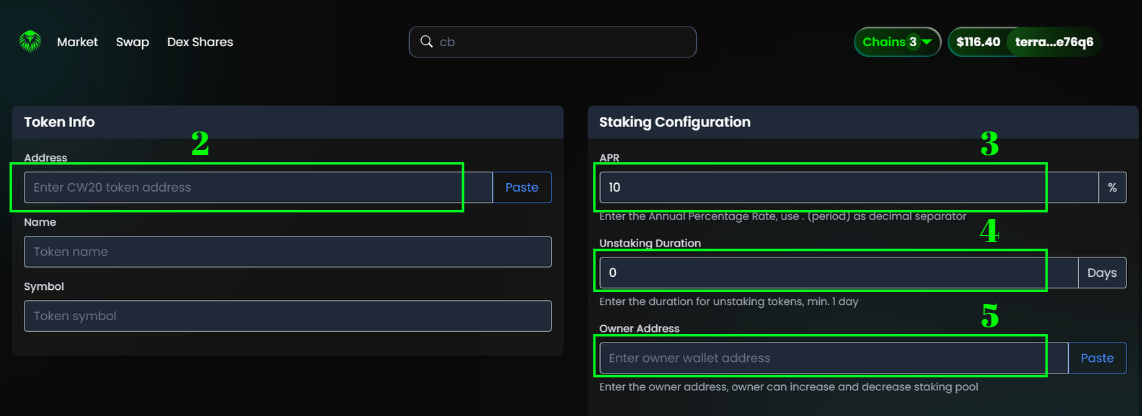
2. Paste the contract address of the CW-20 token. Once it correct the name and symbol will be appear on the below list.
3. Put the APR - Annual Percentage Rate for your token rewards.
4. Configure the unstaking period (unlock) minimum 1 day \~ unlimited
5. **Put The Owner /Admin Address\*** : This address will be the one that able to increase/decrease pool rewards and  manage projects staking configuration in the future.
6. After that click the Register Token : This will required 18 Lunc as gas fee and 2.5K $GRDX Token as register fee.

[Get GRDX Token](https://coinhall.org/terraclassic/terra1mkl973d34jsuv0whsfl43yw3sktm8kv7lgn35fhe6l88d0vvaukq5nq929) When it succeed there will be a TX Hash pop-up on the corner right and the token will be shown on the main menu.&#x20;

If not than you can repeat the process again or contact us on [Telegram](https://t.me/garudanodes_admin)

{% hint style="warning" %}
\**Please make sure to always put the right address on your owner/admin address.*&#x20;
{% endhint %}

<figure><img src="https://1287123956-files.gitbook.io/~/files/v0/b/gitbook-x-prod.appspot.com/o/spaces%2FtxjjcjzH1UYRlroVNUWJ%2Fuploads%2FXGFqKKjyIkdnbFyGlFw7%2Fphoto_2025-08-11_10-50-58.jpg?alt=media&amp;token=d74e3f2c-6265-45bd-bb15-d6e66ff3c298" alt=""><figcaption><p>Register Token Menu</p></figcaption></figure>

## Provide Staking Rewards

If the staking token appear on the main menu, than you can go to the next step : **Provide staking rewards**.

7. Connect with your owner/admin wallet as stated in point 5 then click **stake** on your token menu staking.
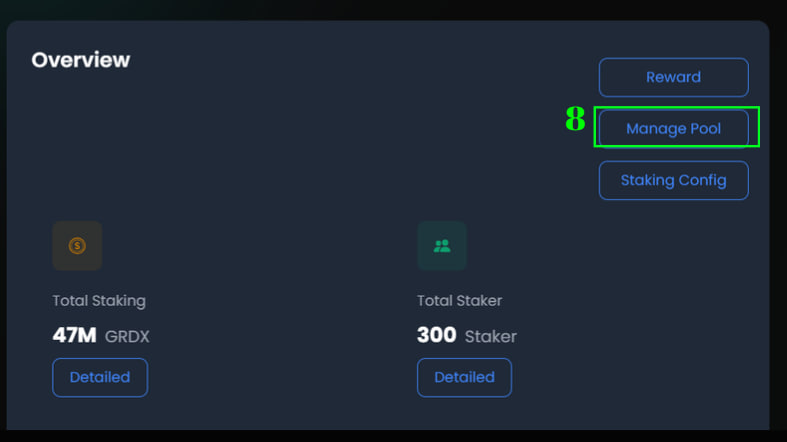
8. Click **Manage Pool** on overview tab
9. In the pool action, click **Increase** and insert the token amount that you will provide as rewards staking.&#x20;
10. Click **Increase Pool** to inisiate contract provide staking rewards.&#x20;

<div><figure><img src="https://1287123956-files.gitbook.io/~/files/v0/b/gitbook-x-prod.appspot.com/o/spaces%2FtxjjcjzH1UYRlroVNUWJ%2Fuploads%2FDTnUoxLgl9kUg2r64IO8%2Fphoto_2025-08-11_11-07-31.jpg?alt=media&amp;token=ecec36b8-4296-4730-bad3-93ba91b8cd1d" alt=""><figcaption></figcaption></figure> <figure><img src="https://1287123956-files.gitbook.io/~/files/v0/b/gitbook-x-prod.appspot.com/o/spaces%2FtxjjcjzH1UYRlroVNUWJ%2Fuploads%2F2teIP6tU4g1sYt8bf1hY%2Fphoto_2025-08-11_11-18-42.jpg?alt=media&amp;token=2b90d44f-ae36-49d1-b66d-8b9373ef2606" alt=""><figcaption></figcaption></figure></div>

<figure><img src="https://1287123956-files.gitbook.io/~/files/v0/b/gitbook-x-prod.appspot.com/o/spaces%2FtxjjcjzH1UYRlroVNUWJ%2Fuploads%2FB0kseimtpoCplCZaKvY2%2Fphoto_2025-08-11_11-19-06.jpg?alt=media&amp;token=d6c50c00-4018-41c2-bd3c-e37815557e14" alt=""><figcaption></figcaption></figure>

## Changes The APRs and Unstake Period

The APR can be modified at anytime, please note any APRs modification will affect all unclaimable staker rewards.&#x20;

11. Connect with your owner/admin wallet as stated in point 5 then click **stake** on your token menu staking.
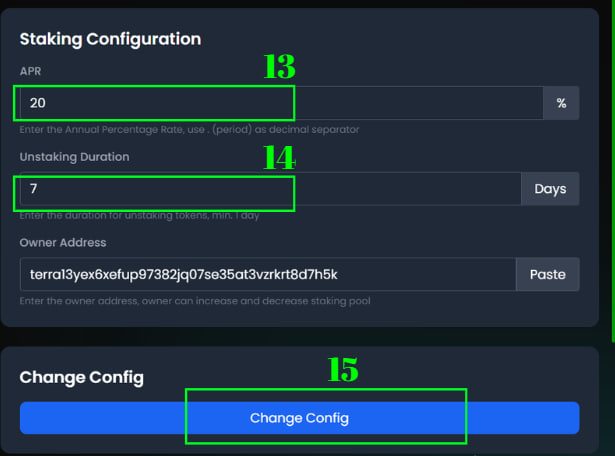
12. Click **Staking Config** on overview tab

13 & 14. On Staking Configuration menu set up the APRs or Unstaking duration that you want to changes.

15. Click change config to execute the changes

<figure><img src="https://1287123956-files.gitbook.io/~/files/v0/b/gitbook-x-prod.appspot.com/o/spaces%2FtxjjcjzH1UYRlroVNUWJ%2Fuploads%2FV1Kg7Llh1kgWdg4TV78m%2Fphoto_2025-08-11_11-29-40.jpg?alt=media&amp;token=72a7803e-0d43-4424-99ae-cde7b3b71ffd" alt=""><figcaption></figcaption></figure>

<figure><img src="https://1287123956-files.gitbook.io/~/files/v0/b/gitbook-x-prod.appspot.com/o/spaces%2FtxjjcjzH1UYRlroVNUWJ%2Fuploads%2FPwfypn6McVIFuJep5dkd%2Fphoto_2025-08-11_11-35-54.jpg?alt=media&amp;token=4efec6d8-a1d7-4cb3-806a-4c06309df3f1" alt=""><figcaption></figcaption></figure>


# Cross Staking

[Cross Staking](https://nft-staking.garuda-defi.org/cross-staking) is stake one token and earn multiple token rewards! <br>

* [Guide for Users](/products/earning/cross-staking/guide-for-users)
* [Guide for Projects](/products/earning/cross-staking/guide-for-projects)


# Guide for Users

This is guide for users to explore and locking their token thru a smart contract and generate multiple token as passive incomes.

## **Staking Token**

Go to [Cross Staking](https://nft-staking.garuda-defi.org/cross-staking) - click home and connect your wallet to open all cross staking pools. **Wallet support : station and kepr wallet**

<figure><img src="https://1287123956-files.gitbook.io/~/files/v0/b/gitbook-x-prod.appspot.com/o/spaces%2FtxjjcjzH1UYRlroVNUWJ%2Fuploads%2FlLtEJHKeMLlOoRvCtA4g%2Fphoto_2024-12-03_10-52-47.jpg?alt=media&amp;token=7bf1098c-b136-4b70-bf1c-61ba73898edb" alt=""><figcaption><p>Cross staking page - before connect wallet</p></figcaption></figure>

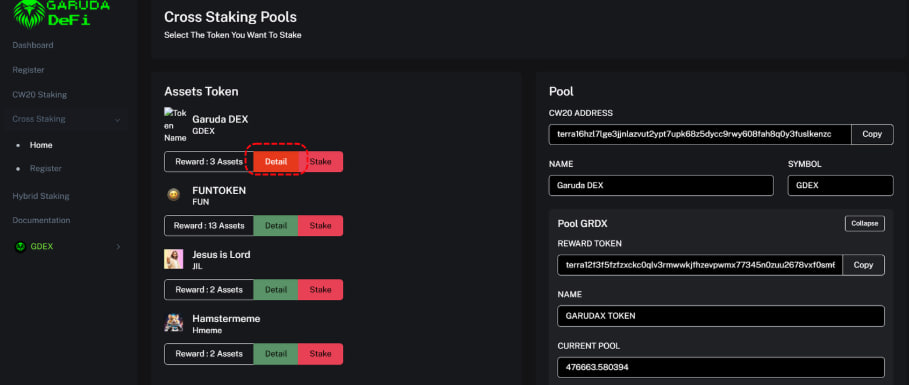
After connect wallet - the cross staking pools will appear. Click detail to see any information about the staking pool (smart contract, token and rewards calculation) or click stake to start staking.&#x20;

<figure><img src="https://1287123956-files.gitbook.io/~/files/v0/b/gitbook-x-prod.appspot.com/o/spaces%2FtxjjcjzH1UYRlroVNUWJ%2Fuploads%2FdAksVpFs7JGU9qoKTLqN%2Fphoto_2024-12-03_10-57-16.jpg?alt=media&amp;token=913954a0-c5e9-4423-8ac7-791ab05052c8" alt=""><figcaption><p>Cross staking pools appear after wallet connection</p></figcaption></figure>

<figure><img src="https://1287123956-files.gitbook.io/~/files/v0/b/gitbook-x-prod.appspot.com/o/spaces%2FtxjjcjzH1UYRlroVNUWJ%2Fuploads%2FRu7ziRAuHJ2Kh8cZZINf%2Fphoto_2024-12-03_11-21-23.jpg?alt=media&amp;token=760c2c9d-4aed-40b2-9adf-1229a51bd190" alt=""><figcaption><p>Pool Detail to check token and rewards per day</p></figcaption></figure>

Put the amount want to stake and proceed by click stake button  (Fee = 9 LUNC and 5 GRDX as burn fee)  [Get GRDX Token](https://coinhall.org/terraclassic/terra1mkl973d34jsuv0whsfl43yw3sktm8kv7lgn35fhe6l88d0vvaukq5nq929)

<figure><img src="https://1287123956-files.gitbook.io/~/files/v0/b/gitbook-x-prod.appspot.com/o/spaces%2FtxjjcjzH1UYRlroVNUWJ%2Fuploads%2FkKrDbEEMTDodIiFW1qgE%2Fphoto_2024-12-03_11-42-40.jpg?alt=media&amp;token=fdab01c6-dec8-416e-82a9-38d4d877e1bd" alt=""><figcaption><p>Staking Page</p></figcaption></figure>

## Withdraw Rewards

User can withdraw the rewards in cross staking at any time.&#x20;

Go to staking page find withdraw tabs and select withdraw all, all the tokens reward will be send directly to your wallet.

<figure><img src="https://1287123956-files.gitbook.io/~/files/v0/b/gitbook-x-prod.appspot.com/o/spaces%2FtxjjcjzH1UYRlroVNUWJ%2Fuploads%2Fa0g1ANHfc4nOMFxrxbw2%2Fphoto_2024-12-04_17-25-44.jpg?alt=media&amp;token=9cf46acf-af2b-4767-abc1-172625ee22bc" alt=""><figcaption></figcaption></figure>

## Unstaking Token

On the Staking page, find unstake tab and put the amount to unstake than click Unstake (You'll find the unlock duration description in unstake button) Fee = 9 LUNC and 5 GRDX as burn fee  [Get GRDX Token](https://coinhall.org/terraclassic/terra1mkl973d34jsuv0whsfl43yw3sktm8kv7lgn35fhe6l88d0vvaukq5nq929)

<figure><img src="https://1287123956-files.gitbook.io/~/files/v0/b/gitbook-x-prod.appspot.com/o/spaces%2FtxjjcjzH1UYRlroVNUWJ%2Fuploads%2FLoq6P2P1cFJh4bbPx9uM%2Fphoto_2024-12-04_17-19-12.jpg?alt=media&amp;token=b5307b55-79f6-4be6-906b-d9ee2e8b7df7" alt=""><figcaption><p>Unstake token in staking page</p></figcaption></figure>

## Claim Unstaked Token

To claim your unstaked token check on Staking page and Unstaked assets. Once the unlock period ended The Claim button will appear and can be execute instanly.

<figure><img src="https://1287123956-files.gitbook.io/~/files/v0/b/gitbook-x-prod.appspot.com/o/spaces%2FtxjjcjzH1UYRlroVNUWJ%2Fuploads%2FUckdtaUijlHtOP09oKxf%2Fphoto_2024-12-04_19-28-33.jpg?alt=media&amp;token=c694ca46-e008-461a-8af6-92376be9935f" alt=""><figcaption><p>Unstaked Assets</p></figcaption></figure>


# Guide for Projects

This is guide for project to create cross staking for their token

## **Create Cross Staking**

Go to [Cross Staking](https://nft-staking.garuda-defi.org/cross-staking) - click Register and connect your wallet. **Wallet support : station and kepr wallet**

<figure><img src="https://1287123956-files.gitbook.io/~/files/v0/b/gitbook-x-prod.appspot.com/o/spaces%2FtxjjcjzH1UYRlroVNUWJ%2Fuploads%2FWs5vQKT4azA5YCSZ60qL%2Fphoto_2025-01-06_23-14-27.jpg?alt=media&amp;token=f5544b7e-e950-4968-8762-f5eb097be5e0" alt=""><figcaption><p>Register Cross Staking Page </p></figcaption></figure>

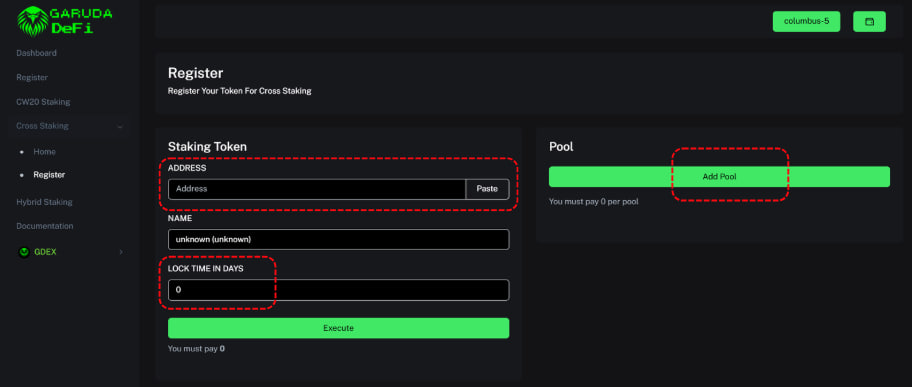
Fill the staking token with your CW-20 token address and lock time period in days (eg: 1 or 3 days). After that click add pool to provide rewards pool.

<figure><img src="https://1287123956-files.gitbook.io/~/files/v0/b/gitbook-x-prod.appspot.com/o/spaces%2FtxjjcjzH1UYRlroVNUWJ%2Fuploads%2Fes3tH0TZSKKIhsagebNP%2Fphoto_2025-01-06_23-25-33.jpg?alt=media&amp;token=8f91ec20-2eca-4a26-8834-734e22a22bf4" alt=""><figcaption><p>Register Cross Staking Page </p></figcaption></figure>

Pool rewards is the reward that you want to shares with stakers.&#x20;

It can be more than one and can be LUNC, USTC or CW-20 Token. You can start provide by fill the reward token with address/smart contract and *rewards per day\*.* \
If  you want to add pool just click add pool and repeat the process. Each pool will required 2.5K $GRDX token as fees. (50% for DeFi development and 50% for Burn GRDX).&#x20;

When it finish, you can start click execute to process payment and will generate cross staking contract for your CW-20 Token.

<figure><img src="https://1287123956-files.gitbook.io/~/files/v0/b/gitbook-x-prod.appspot.com/o/spaces%2FtxjjcjzH1UYRlroVNUWJ%2Fuploads%2FrGGJHWhZBpJoxvn2XDN4%2Fphoto_2025-01-06_23-40-00.jpg?alt=media&amp;token=51dd27a9-d333-4917-b599-2d62a3896b13" alt=""><figcaption><p>Provide Pool Rewards</p></figcaption></figure>

{% hint style="info" %}
*\*Rewards per day is the amount reward to provide per 1 token in a day. For example : Project want to provide rewards 10 token A per day for 1 token B staked.*&#x20;
{% endhint %}

{% hint style="warning" %}
*Once Cross Staking contract create creator can't delete the staking token and pool rewards*
{% endhint %}

## Manage Pool

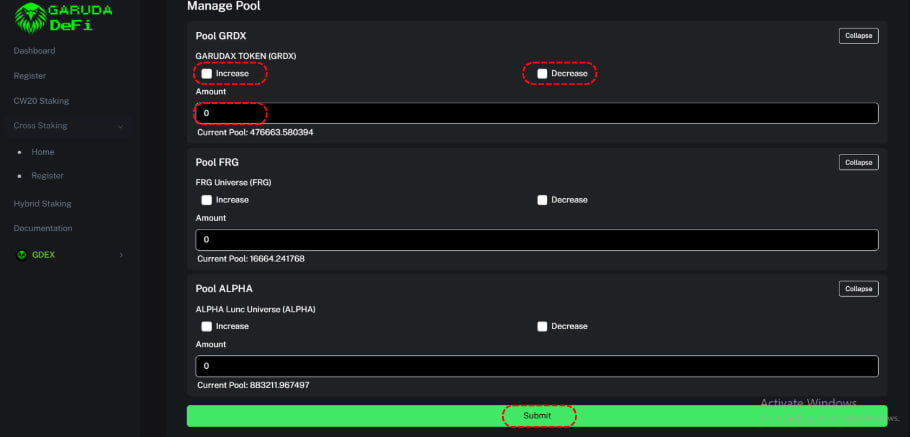
Manage pool allow you to increase (deposit) or decrease (withdraw) your pools reward.&#x20;

Find your staking token on home, click on detail and scroll down to find manage pool.&#x20;

<div><figure><img src="https://1287123956-files.gitbook.io/~/files/v0/b/gitbook-x-prod.appspot.com/o/spaces%2FtxjjcjzH1UYRlroVNUWJ%2Fuploads%2FRMmmZ9cUdX2KcDhVztrl%2Fphoto_2025-01-06_23-52-26.jpg?alt=media&amp;token=8f36b8a7-279d-4c67-8dfb-bf8b315373e4" alt=""><figcaption><p>Click detail</p></figcaption></figure> <figure><img src="https://1287123956-files.gitbook.io/~/files/v0/b/gitbook-x-prod.appspot.com/o/spaces%2FtxjjcjzH1UYRlroVNUWJ%2Fuploads%2FTJ3VrYU1Ls3k11JSxYDZ%2Fphoto_2025-01-06_23-53-19.jpg?alt=media&amp;token=00657fd2-57e9-4139-b3f0-54e0e1b8bd0d" alt=""><figcaption><p>Click Manage Pool</p></figcaption></figure></div>

On manage pool page, click increase/decrease to deposit or withdrawal your rewards pool and put the amount and click submit.

<figure><img src="https://1287123956-files.gitbook.io/~/files/v0/b/gitbook-x-prod.appspot.com/o/spaces%2FtxjjcjzH1UYRlroVNUWJ%2Fuploads%2FuPBw7xAeQAbizryeL84e%2Fphoto_2025-01-06_23-58-13.jpg?alt=media&amp;token=4a81f172-7a53-4962-8fdd-53e800b5641a" alt=""><figcaption><p>Manage Pool Page</p></figcaption></figure>

{% hint style="info" %}
Initial deposit on manage pool required to make cross staking live so stakers can earn rewards
{% endhint %}

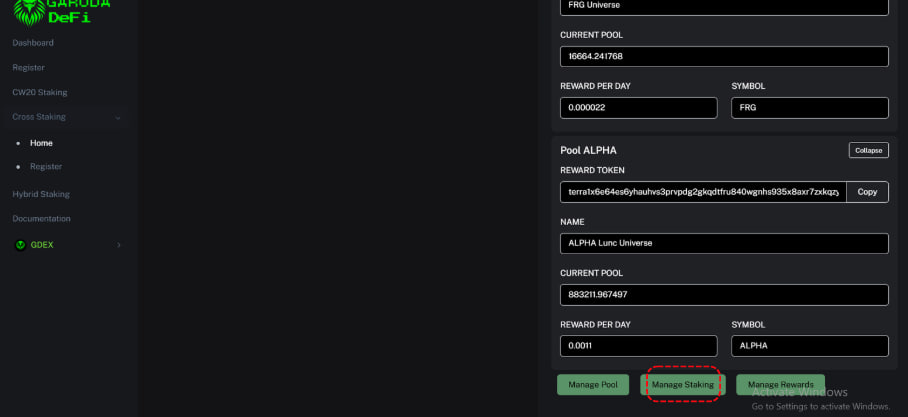
## Manage Staking

Manage staking to changes the unlock duration of your cross staking tokens.

Find your staking token on home, click on detail and scroll down to find manage staking.&#x20;

Put the duration time to changes in days and click execute.

<div><figure><img src="https://1287123956-files.gitbook.io/~/files/v0/b/gitbook-x-prod.appspot.com/o/spaces%2FtxjjcjzH1UYRlroVNUWJ%2Fuploads%2FfUyBtcgHEkQcsaBZhLSD%2Fphoto_2025-01-06_23-52-26.jpg?alt=media&amp;token=cb3d5e6c-2598-4007-8b52-f64235188b47" alt=""><figcaption><p>Click detail</p></figcaption></figure> <figure><img src="https://1287123956-files.gitbook.io/~/files/v0/b/gitbook-x-prod.appspot.com/o/spaces%2FtxjjcjzH1UYRlroVNUWJ%2Fuploads%2FUYOEkhDILiRBfIMcXaxX%2Fphoto_2025-01-07_00-09-46.jpg?alt=media&amp;token=8bd33056-28f9-46fc-b113-6f637bf615df" alt=""><figcaption><p>Click Manage Pool</p></figcaption></figure></div>

<figure><img src="https://1287123956-files.gitbook.io/~/files/v0/b/gitbook-x-prod.appspot.com/o/spaces%2FtxjjcjzH1UYRlroVNUWJ%2Fuploads%2FgIgs4aTaaPefGUXIR4i1%2Fphoto_2025-01-07_00-12-24.jpg?alt=media&amp;token=7afad21f-f180-4362-a63f-4a06b5f2323e" alt=""><figcaption><p>Manage Staking page</p></figcaption></figure>

## Manage Rewards

Manage rewards to add more pool rewards for your cross staking.&#x20;

Find your staking token on home, click on detail and scroll down to find manage rewards.

<div><figure><img src="https://1287123956-files.gitbook.io/~/files/v0/b/gitbook-x-prod.appspot.com/o/spaces%2FtxjjcjzH1UYRlroVNUWJ%2Fuploads%2FKOtw8JogSAsVCmJrvEWb%2Fphoto_2025-01-06_23-52-26.jpg?alt=media&amp;token=6641a8f9-2293-4cd5-8d25-b98ab5472f1e" alt=""><figcaption><p>Click detail</p></figcaption></figure> <figure><img src="https://1287123956-files.gitbook.io/~/files/v0/b/gitbook-x-prod.appspot.com/o/spaces%2FtxjjcjzH1UYRlroVNUWJ%2Fuploads%2Fq4Z84jme1XD9DrDUrSUK%2Fphoto_2025-01-07_00-17-31.jpg?alt=media&amp;token=c344b0c8-754b-44fa-baf5-123eb5d8f2eb" alt=""><figcaption><p>click manage detail</p></figcaption></figure></div>

Click add pool and repeat the process on to add more rewards. Click execute after finished, and don't forget to provide the rewards by [Manage Pool](#manage-pool)

<figure><img src="https://1287123956-files.gitbook.io/~/files/v0/b/gitbook-x-prod.appspot.com/o/spaces%2FtxjjcjzH1UYRlroVNUWJ%2Fuploads%2FStW42n7wRY5ltKbeGN2I%2Fphoto_2025-01-07_00-19-49.jpg?alt=media&amp;token=8836d549-a278-43b9-85e5-fddf19b03bea" alt=""><figcaption><p>Manage Rewards Page</p></figcaption></figure>


# NFT Staking

NFT staking platform development allows creators to expand the utility of NFTs beyond traditional ownership.&#x20;

By integrating staking mechanisms, creators can provide NFT holders with additional earning opportunities, transforming static assets into dynamic revenue generators.&#x20;

This increased utility enhances the appeal of NFTs and attracts a broader audience of users to the platform.&#x20;

<figure><img src="https://1287123956-files.gitbook.io/~/files/v0/b/gitbook-x-prod.appspot.com/o/spaces%2FtxjjcjzH1UYRlroVNUWJ%2Fuploads%2FL1a6qScPkx2vfFYjk1kW%2FBlue%20Futuristic%20Business%20Roadmap%20Presentation%20(38).png?alt=media&amp;token=8d33027d-fdbd-4686-ad95-c1a8fe770f40" alt=""><figcaption></figcaption></figure>


# Guide for NFT Holders

This is guidelines for holders to use NFT Staking dapps on Garuda Defi.

## **Connect Wallet**

Make sure to connect the wallet before execute the contracts on the Garuda Defi Platform.&#x20;

Wallet support: Keplr and station (both in extension and mobile)

## **Choose NFT** &#x20;

Go to [Garuda-DeFi](https://garuda-defi.org/#) , click NFT Staking.

Choose the NFT collection from the list, click stake button to staking page, Mint/buy to NFT Marketplace link and Detail for more information about the NFT collection staking configuration.

{% hint style="warning" %}
*Do your own research before invest on every projects, including NFTs.*
{% endhint %}

<figure><img src="https://1287123956-files.gitbook.io/~/files/v0/b/gitbook-x-prod.appspot.com/o/spaces%2FtxjjcjzH1UYRlroVNUWJ%2Fuploads%2FDyZSYnetV1zzrCCP3gL8%2Fphoto_2024-10-25_03-04-59.jpg?alt=media&amp;token=3d6ecec3-e9ac-44f1-add8-57f33ebfbf6c" alt=""><figcaption><p>List of collection NFT Staking</p></figcaption></figure>

<figure><img src="https://1287123956-files.gitbook.io/~/files/v0/b/gitbook-x-prod.appspot.com/o/spaces%2FtxjjcjzH1UYRlroVNUWJ%2Fuploads%2FODeahda48KHYC8YQu2vx%2Fphoto_2024-10-25_03-12-44.jpg?alt=media&amp;token=41b39940-cb9e-4c7b-8fd8-13cb900a6f1e" alt=""><figcaption><p>Sample of NFT Staking Details</p></figcaption></figure>

## Staking NFT\*

After clicking on staking on a registered NFT Collection, users will be directed to the staking page link.

The NFT will be displayed there, once the user connects a wallet that has the NFT item.&#x20;

Select an NFT (Can be more than one) and press the staking button to execute staking by confirming the transaction in the connected wallet.&#x20;

Staking NFT will require **2.5 GRDX token** as 🔥burn fee for each NFT.   [Get GRDX Token](https://coinhall.org/terraclassic/terra1mkl973d34jsuv0whsfl43yw3sktm8kv7lgn35fhe6l88d0vvaukq5nq929)

{% hint style="danger" %}
If an error occurs, it could be due to insufficient fees or because the NFT is still in staking mode on another platform.
{% endhint %}

<figure><img src="https://1287123956-files.gitbook.io/~/files/v0/b/gitbook-x-prod.appspot.com/o/spaces%2FtxjjcjzH1UYRlroVNUWJ%2Fuploads%2FlAF3Jb3MU39Wczm9uVgI%2Fphoto_2024-10-25_03-26-02.jpg?alt=media&amp;token=87c7785a-5d7f-41d7-9253-e7e44ff43b62" alt=""><figcaption><p>Stake NFT on staking page</p></figcaption></figure>

## Withdraw Rewards and Unstake

The rewards that will be displayed are the prize pool after the user stakes. Users can only withdraw all of them, cannot withdraw some of them.

Click withdraw and confirm the transaction in the connected wallet.&#x20;

Choose NFTs staked (can be more than one) on the list and press the unstake button.&#x20;

The NFT unstaked will be displayed after unstake period ended and can be claimed.&#x20;

Unstaking NFT will require 2.5 GRDX token for each NFT.   [Get GRDX Token](https://coinhall.org/terraclassic/terra1mkl973d34jsuv0whsfl43yw3sktm8kv7lgn35fhe6l88d0vvaukq5nq929)

<figure><img src="https://1287123956-files.gitbook.io/~/files/v0/b/gitbook-x-prod.appspot.com/o/spaces%2FtxjjcjzH1UYRlroVNUWJ%2Fuploads%2FIXJygpDKHsS4aTVou1dL%2Fphoto_2024-10-25_03-32-58.jpg?alt=media&amp;token=61e6cb21-d329-4560-8b0f-008ddf8ff404" alt=""><figcaption></figcaption></figure>

## &#x20;


# Guide for NFT Creators

As a creators / founders who owned NFT project, can create NFT Staking Contract by register - setting staking configuration and provide staking rewards on Garuda Defi without coding skills.&#x20;

These are some step :&#x20;

## **Connect Wallet**

Make sure to connect the wallet before execute the contracts on the Garuda Defi Platform.&#x20;

Wallet support: Keplr and station (both in extension and mobile)

## **Register**

Go to [Garuda-DeFi](https://garuda-defi.org/#), on the main menu choose **NFT Staking**.&#x20;

On the dashboard click **Register**

{% hint style="danger" %}
*Register is only a feature used by creators, not recommended for NFT Holders*
{% endhint %}

<figure><img src="https://1287123956-files.gitbook.io/~/files/v0/b/gitbook-x-prod.appspot.com/o/spaces%2FtxjjcjzH1UYRlroVNUWJ%2Fuploads%2FXfds4iZMmhaS3GO4eDZg%2Fphoto_2024-10-25_01-30-08.jpg?alt=media&amp;token=03a767a4-1177-4694-b8c5-1c17aa3a5703" alt=""><figcaption><p>Main Menu NFT Staking</p></figcaption></figure>

To register there is a requirement **2.5K GRDX as fee** , make sure to have that balance in the wallet connected. [Buy GRDX here](https://coinhall.org/terraclassic/terra1mkl973d34jsuv0whsfl43yw3sktm8kv7lgn35fhe6l88d0vvaukq5nq929)

In NFT Information, fill in the address with the **NFT Smart Contract Collection\***. The name will be displayed, if not displayed - please double check the address.&#x20;

Insert the image to be displayed in the main menu and paste the Link with the NFT Marketplace page, so that users can mint/purchase NFTs by referring to the link.

In Token Rewards Information, fill in the address with the **CW20-Token Smart Contract \***. The name will be displayed, if not displayed - please double check the address.&#x20;

Click execute and confirm the transaction on wallet connected.

{% hint style="danger" %}
*Please double check NFT and CW20 Token Smart Contract MUST be accurate.*
{% endhint %}

<figure><img src="https://1287123956-files.gitbook.io/~/files/v0/b/gitbook-x-prod.appspot.com/o/spaces%2FtxjjcjzH1UYRlroVNUWJ%2Fuploads%2FVaZy0jYmarxBh9J1ynJZ%2Fphoto_2024-10-25_01-34-33.jpg?alt=media&amp;token=6e4e8c04-da51-45c8-9f98-1dc91999fe26" alt=""><figcaption><p>Register NFT Page</p></figcaption></figure>

## Go To Staking Config

After successful registration, the NFT collection will be displayed in the main menu.&#x20;

Click detail, a staking config button will appear and click it.&#x20;

<figure><img src="https://1287123956-files.gitbook.io/~/files/v0/b/gitbook-x-prod.appspot.com/o/spaces%2FtxjjcjzH1UYRlroVNUWJ%2Fuploads%2FomIrl7RNIayeR9Ef1X98%2Fphoto_2024-10-25_01-55-20.jpg?alt=media&amp;token=f62e5ed9-55c6-4aea-8795-a3afadfee1cd" alt=""><figcaption><p>Click detail on NFT listed and staking config button</p></figcaption></figure>

## Staking Configuration\*

{% hint style="info" %}
These action will required several execute contract and transaction on wallet connected.
{% endhint %}

Insert an amount token on the pool rewards at manage pool. This action can be adjustable by withdraw (to decrease) or deposit (to increase) the pool rewards.

After insert an amount, click deposit button to execute and sign the transaction for sending an amount token from wallet to the pool rewards.&#x20;

Insert a number for unstaking period, click the execute button and sign the confirmation on the wallet.

<figure><img src="https://1287123956-files.gitbook.io/~/files/v0/b/gitbook-x-prod.appspot.com/o/spaces%2FtxjjcjzH1UYRlroVNUWJ%2Fuploads%2FziMNiqjGNpUL5HJLI8l2%2Fphoto_2024-10-25_02-05-42.jpg?alt=media&amp;token=93ea711c-0a72-4246-8c18-aef3e9f3ab11" alt=""><figcaption><p>Manage pool rewards and unstaking period</p></figcaption></figure>

Set up the NFT rewards on NFT Trait configuration.&#x20;

Assign NFT trait by select the rarity, click add and enter the amount of token rewards per day.&#x20;

If collection did not have rarity, select **default \*** and enter the amount of token rewards per day.&#x20;

Click add if creators want to assign more NFT trait to reward.

After all done, click execute and sign the confirmation on wallet connected.

{% hint style="info" %}
*We recommend to use default options in case there is a typo in rarity trait. If not, the rewards will not distributed or claimed.*
{% endhint %}

<div><figure><img src="https://1287123956-files.gitbook.io/~/files/v0/b/gitbook-x-prod.appspot.com/o/spaces%2FtxjjcjzH1UYRlroVNUWJ%2Fuploads%2FMaoK0sCK6fwQiFZkTXsL%2Fphoto_2024-10-25_02-35-53.jpg?alt=media&amp;token=9ffb49bb-ccaa-4285-a488-861eb561df2b" alt=""><figcaption><p>Assign NFT trait to reward</p></figcaption></figure> <figure><img src="https://1287123956-files.gitbook.io/~/files/v0/b/gitbook-x-prod.appspot.com/o/spaces%2FtxjjcjzH1UYRlroVNUWJ%2Fuploads%2FUbTMTM2TjD91HIdDkDIn%2Fphoto_2024-10-25_02-35-57.jpg?alt=media&amp;token=bfbb2010-fee0-4646-a226-1f2d7bd08b63" alt=""><figcaption><p>Click execute after assigned</p></figcaption></figure></div>

Double check on the main page and click detail to display all NFT configuration.

If creators still have a problem, visit us on [Telegram Group](https://t.me/Garudaverse99) or send [DM to our Admin](https://t.me/garudanodes_admin) on telegram.&#x20;


# Hybrid Staking

New way to earn more rewards with staking the native token (LUNC) in Garuda-Defi

## What is Hybrid Staking?

Hybrid Staking is combination between Proof of Stake (PoS) in LUNC chain with CW-20 staking. \
Aim to give more extra rewards to users and give more use case to project or Validators to develop their ecosystem in Luna Classic.&#x20;

<figure><img src="https://1287123956-files.gitbook.io/~/files/v0/b/gitbook-x-prod.appspot.com/o/spaces%2FtxjjcjzH1UYRlroVNUWJ%2Fuploads%2FcKb6pnToxgwVaaD6mWQu%2FBlue%20Futuristic%20Business%20Roadmap%20Presentation%20(12).png?alt=media&amp;token=502b313d-4e10-4807-8fa6-1a455d6ab5bb" alt=""><figcaption></figcaption></figure>

### **How Does Hybrid Staking** Work on Garuda-Defi? <a href="#h-how-does-liquid-staking-work" id="h-how-does-liquid-staking-work"></a>

The LUNC staked by users on Garuda-DeFi platform will be delegated to one of many validators participating in the Hybrid Staking protocol on Garuda-DeFi Platforms.&#x20;

Rewards generated from delegates will be split (Depending on validator configuration), split rewards on validator side will be use to buyback the CW20 token and distributed to users along with the native token (LUNC and USTC) via Hybrid staking smart contract.&#x20;

This innovation of Hybrid staking opens up a world of possibilities for users, enabling them to potentially earn multiple staking rewards (LUNC, USTC and CW20 tokens) without giving up the liquidity.

&#x20;&#x20;


# Guide for Users

This is guide for users to staking LUNC on Garuda-DeFi Hybrid staking protocols and earn LUNC, USTC and CW-20 Token as return

## Staking Lunc

&#x20;Go to [https://staking.garuda-defi.org](https://staking.garuda-defi.org/) , on Side menu click Hybrid Staking.

<figure><img src="https://1287123956-files.gitbook.io/~/files/v0/b/gitbook-x-prod.appspot.com/o/spaces%2FtxjjcjzH1UYRlroVNUWJ%2Fuploads%2FlM4ll6ONovmWgJMwJUfo%2Fphoto_2024-09-09_10-04-25.jpg?alt=media&amp;token=979010fb-31bd-4657-970c-99fe4a19cf12" alt=""><figcaption><p>Click Hybrid Staking on SIde Menu</p></figcaption></figure>

Connect the wallet (Station / Keplr wallet).&#x20;

On Hybrid Staking Pools, choose the Validators and CW20 Token rewards that available on the list and click Stake

<figure><img src="https://1287123956-files.gitbook.io/~/files/v0/b/gitbook-x-prod.appspot.com/o/spaces%2FtxjjcjzH1UYRlroVNUWJ%2Fuploads%2FujRDL24xfysaAEydq5S8%2Fphoto_2024-09-09_10-07-01.jpg?alt=media&amp;token=28f1d22f-89a9-4f7f-8f53-1985ea0acd18" alt=""><figcaption><p>Choose Validators Pool available</p></figcaption></figure>

Enter the amount of LUNC to stake , click stake button, than approve the transaction\*.&#x20;

{% hint style="info" %}
Please note, every transaction on stake will required 21 days locked. and 0.5% burn tax&#x20;
{% endhint %}

<figure><img src="https://1287123956-files.gitbook.io/~/files/v0/b/gitbook-x-prod.appspot.com/o/spaces%2FtxjjcjzH1UYRlroVNUWJ%2Fuploads%2FDp6HgQJpca44yoQASnyV%2Fphoto_2024-09-09_10-08-42.jpg?alt=media&amp;token=f14ff0f1-eb38-46cd-a400-e3ef3ccea3c8" alt=""><figcaption></figcaption></figure>

## Rewards

The rewards will have 3 tokens: Native token ($LUNC - $USTC) and CW-20 token ($GRDX)&#x20;

<figure><img src="https://1287123956-files.gitbook.io/~/files/v0/b/gitbook-x-prod.appspot.com/o/spaces%2FtxjjcjzH1UYRlroVNUWJ%2Fuploads%2FXY4bAEJwYkwszlrZn6ks%2Fphoto_2024-08-15_18-04-11.jpg?alt=media&amp;token=1f839a7f-e8e9-408c-bd69-bf4ea1e1e2c8" alt=""><figcaption><p>Rewards sample</p></figcaption></figure>

## Withdraw Rewards

On manage asset, click withdraw (leave the box blank) and approve the transaction.

<figure><img src="https://1287123956-files.gitbook.io/~/files/v0/b/gitbook-x-prod.appspot.com/o/spaces%2FtxjjcjzH1UYRlroVNUWJ%2Fuploads%2F5ONUNYOCd6TeVOhFBx4M%2Fphoto_2024-08-15_18-05-48.jpg?alt=media&amp;token=890316fd-d010-4bb9-a3a9-c71f12b1b901" alt=""><figcaption></figcaption></figure>

## Unstake

On manage asset, click unstake (fill the amount to unstake) and approve the transaction\*

{% hint style="info" %}
The fund will be arrive in 21 days and need to redeem/claim manually on the platform
{% endhint %}

<figure><img src="https://1287123956-files.gitbook.io/~/files/v0/b/gitbook-x-prod.appspot.com/o/spaces%2FtxjjcjzH1UYRlroVNUWJ%2Fuploads%2FQQn4CON2w2QC9uVCPijf%2Fphoto_2024-08-15_18-12-59.jpg?alt=media&amp;token=ee3d34ab-1f93-4bdf-9bc7-32a8467c0643" alt=""><figcaption></figcaption></figure>

## Claim the unstake LUNC

Once the token has reach the unlock period, user can claim and the funds will be sent to their wallet.

<figure><img src="https://1287123956-files.gitbook.io/~/files/v0/b/gitbook-x-prod.appspot.com/o/spaces%2FtxjjcjzH1UYRlroVNUWJ%2Fuploads%2FpimSoqbCkEHKz3LeVkLb%2Fphoto_2024-08-15_18-15-51.jpg?alt=media&amp;token=97401f1b-feef-4458-9cba-153dabeb81b8" alt=""><figcaption></figcaption></figure>


# Guide for Validators

coming soon

## Coming Soon

&#x20;


# P2P

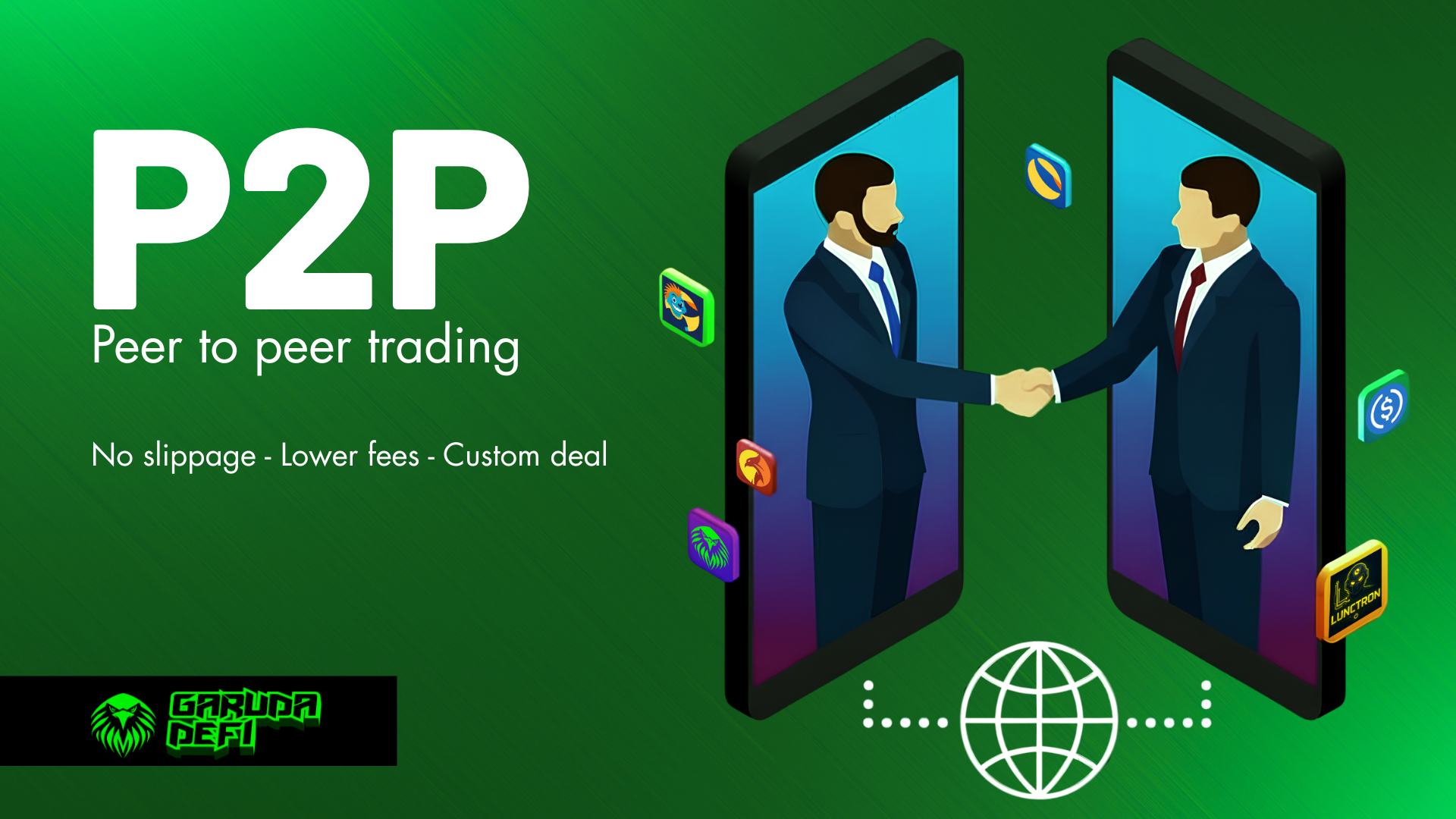
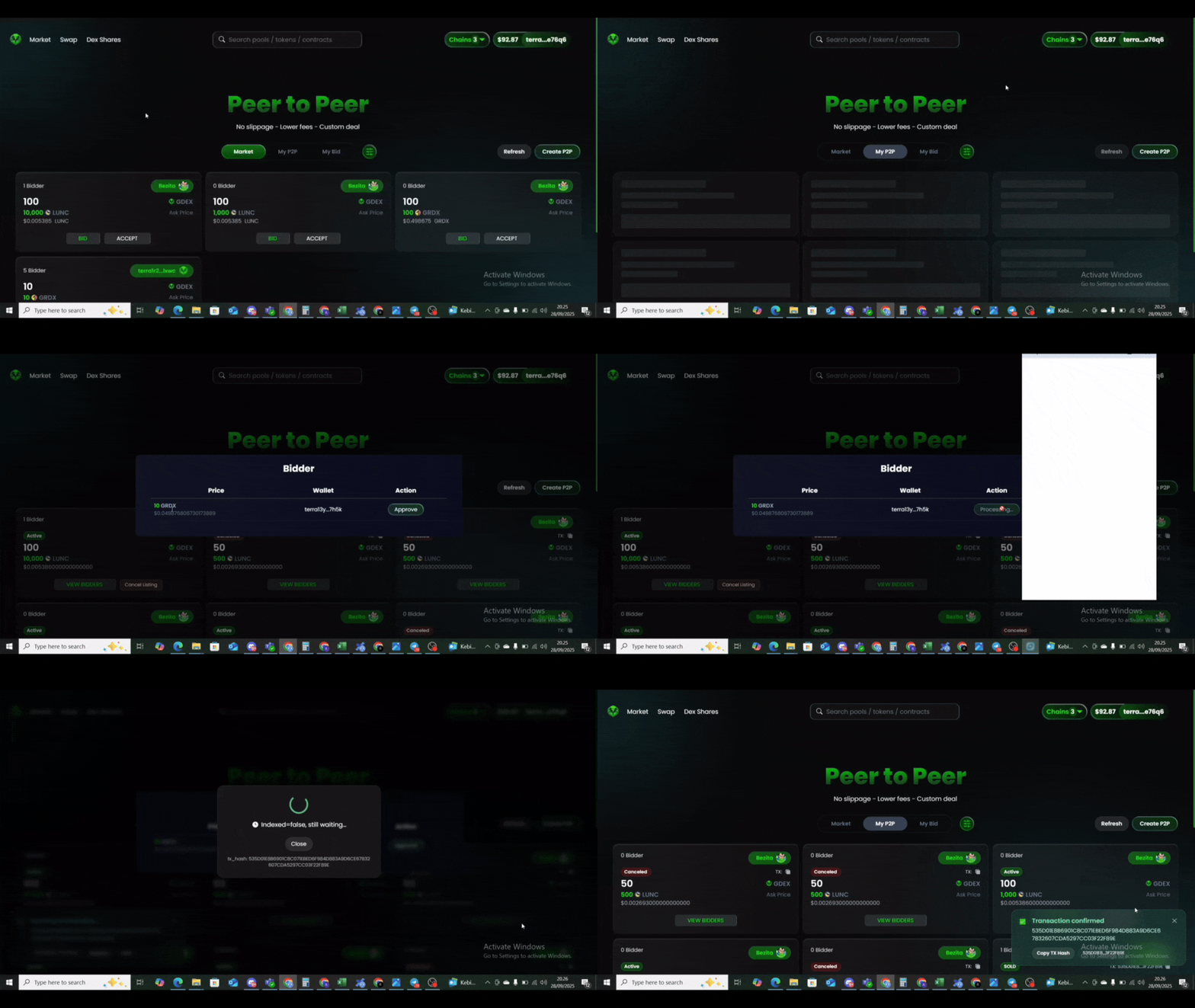
Garuda DeFi **Peer-to-Peer (P2P)** allows users to trade directly with each other : no slippage, low fees, and customizable deals. Every transaction are executed by smart contracts, ensuring security and eliminating the need for any middleman.

<figure><img src="https://1287123956-files.gitbook.io/~/files/v0/b/gitbook-x-prod.appspot.com/o/spaces%2FtxjjcjzH1UYRlroVNUWJ%2Fuploads%2FxJWwVli1yR3g2kx2gGRf%2FBlue%20Futuristic%20Business%20Roadmap%20Presentation%20-%202025-09-28T151538.615.png?alt=media&amp;token=9069436f-1795-4f5e-b889-f24e52fb5775" alt=""><figcaption></figcaption></figure>

## What is P2P in Garuda DeFi?

P2P lets you trade (buy and sell) Crypto assets permisionless on Terra Classic network directly each others without a middleman on a Garuda DeFi platform with easily, cheap\* and customizable deals.&#x20;

{% hint style="info" %}
*\*Fees : only 0.3% for deal transaction, 100% fees go to* [*protocol shares* ](/products/earning/gdex-shares)
{% endhint %}

## How to List Your P2P

To create a P2P listing on Garuda DeFi, you must hold at least **2.5 GRDX tokens** for the burn fee.

1. Connect your wallet
2. Go to the [P2P page](https://garuda-defi.org/market/p2p)
3. Click "Create P2P"
4. Select the token and amount you want to list
5. Select the token and amount you want to receive as payment
6. Confirm and execute the listing

<figure><img src="https://1287123956-files.gitbook.io/~/files/v0/b/gitbook-x-prod.appspot.com/o/spaces%2FtxjjcjzH1UYRlroVNUWJ%2Fuploads%2FAnZMX0ZsC0bEj8x11EaY%2Fvideo_2025-09-28_15-48-00%20(1).gif?alt=media&amp;token=eee5b9f4-8d74-45a2-bd42-8734784a4415" alt="Listing My P2P"><figcaption></figcaption></figure>

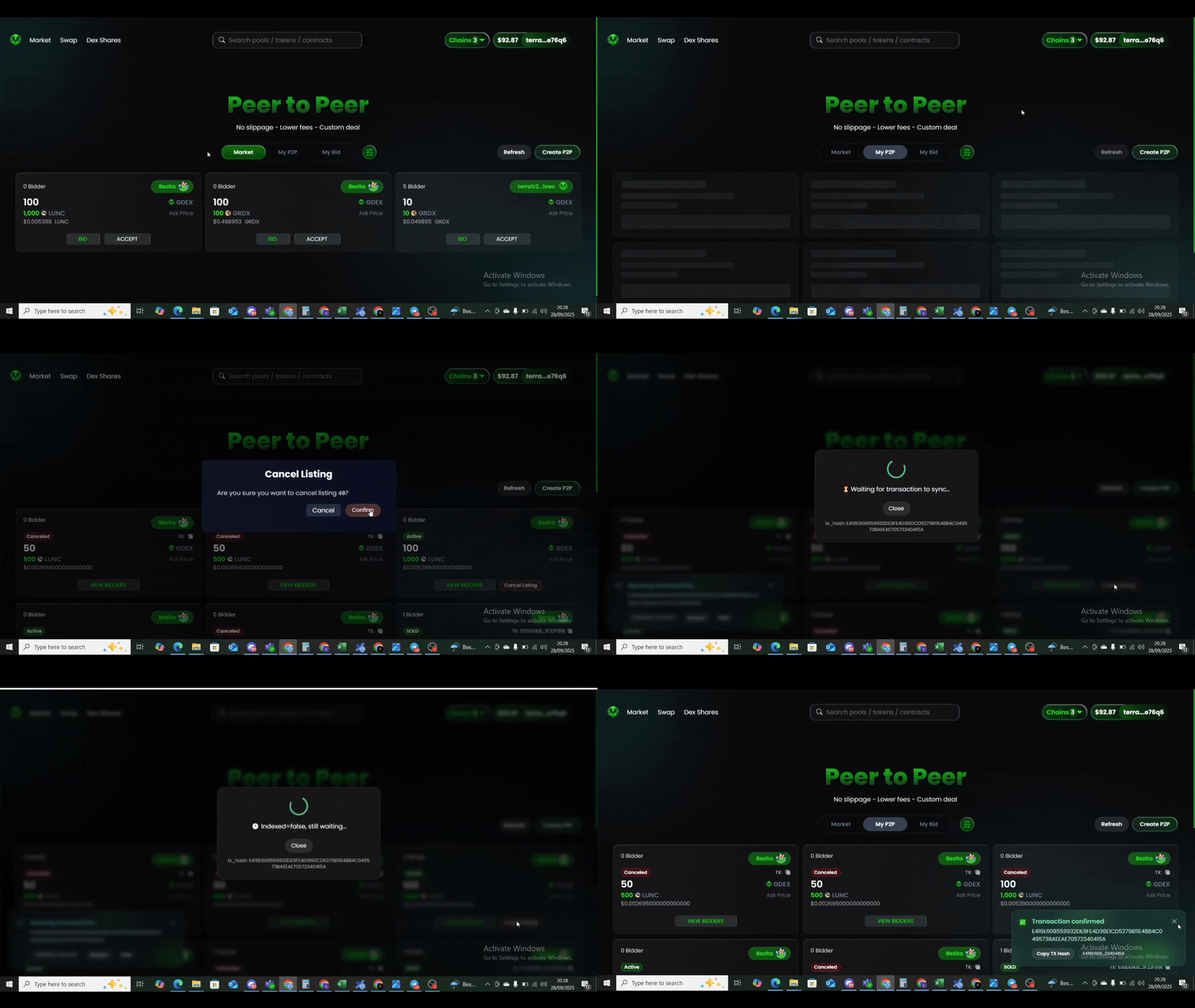
## Canceling a P2P Listing

Each P2P listing has a non-refundable fee of 2.5 GRDX. P2P user listings can cancelled anytime, however. No additional fees are charged, only standard blockchain gas fees apply.

1. Go to the [P2P page](https://garuda-defi.org/market/p2p)
2. Click on "**My P2P"**
3. Find the P2P you want to cancel, then click **"Cancel Listing"** and execute

<figure><img src="https://1287123956-files.gitbook.io/~/files/v0/b/gitbook-x-prod.appspot.com/o/spaces%2FtxjjcjzH1UYRlroVNUWJ%2Fuploads%2FmAZqON3IdA5L0JdUWlWP%2Fcancel%20listing.gif?alt=media&amp;token=6239563a-dac6-478c-b437-27978d6354a6" alt=""><figcaption></figcaption></figure>

## Approving a Bid

Once your P2P is listed, you can approve any bid at any time.

1. Go to the [P2P page](https://garuda-defi.org/market/p2p)
2. Click on "**My P2P"**
3. Find your listing, select the bidder you want to approve, then click **"Approve"** to execute

<figure><img src="https://1287123956-files.gitbook.io/~/files/v0/b/gitbook-x-prod.appspot.com/o/spaces%2FtxjjcjzH1UYRlroVNUWJ%2Fuploads%2FDFqe7q8BxhsbNZTBphPN%2Faccept%20bid.gif?alt=media&amp;token=bf6ce7d3-4bf8-4120-8242-edfdbc852799" alt=""><figcaption></figcaption></figure>

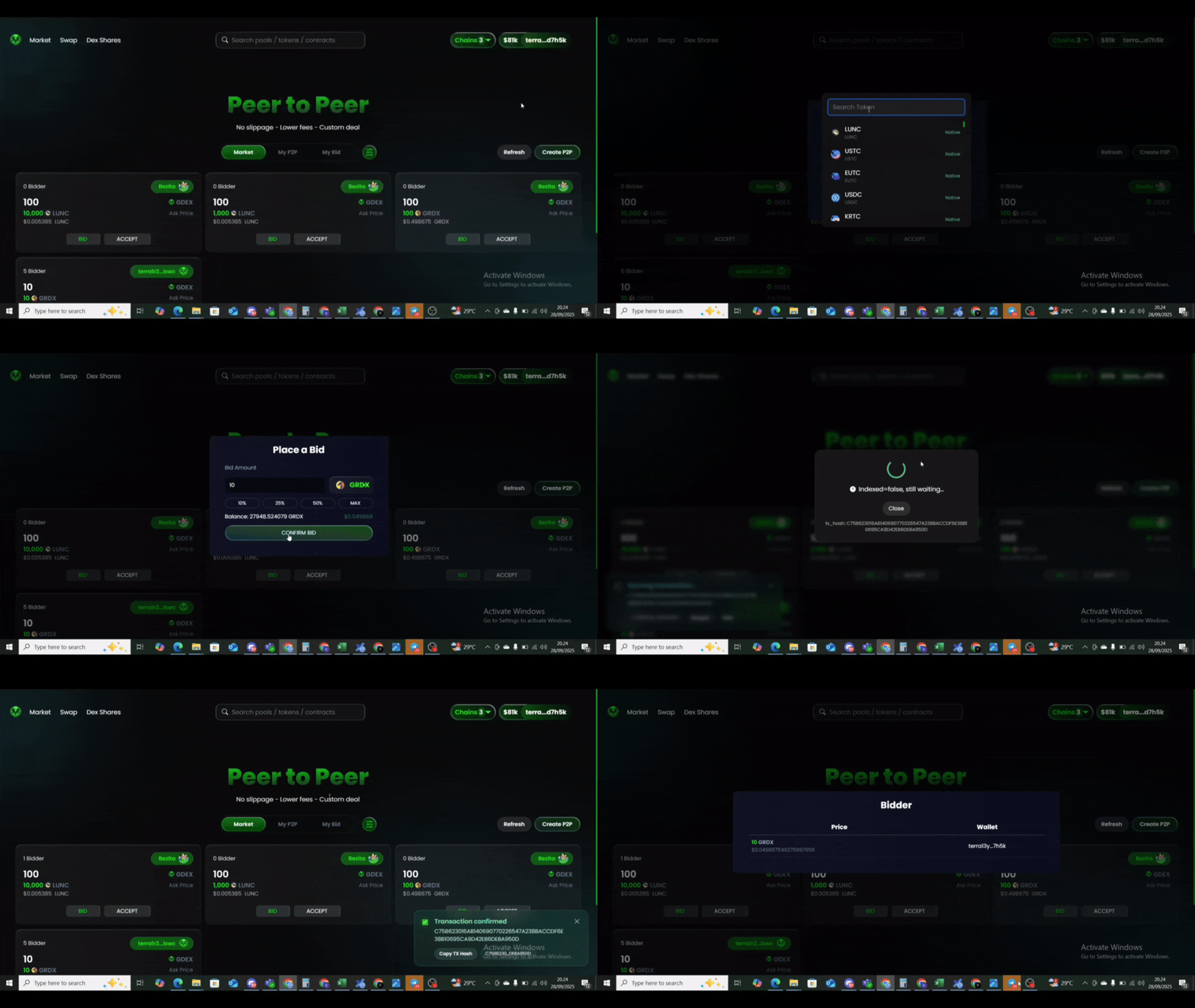
## Bidding on a P2P Listing

You can place a bid on any P2P listing using any supported token as payment.

1. On the selected P2P listing, click **"BID"**
2. Choose the token and amount you want to use
3. Confirm and execute your bid

<figure><img src="https://1287123956-files.gitbook.io/~/files/v0/b/gitbook-x-prod.appspot.com/o/spaces%2FtxjjcjzH1UYRlroVNUWJ%2Fuploads%2FwLsGI8zdaWVCVpu2PJ3q%2Fhow%20to%20bid.gif?alt=media&amp;token=d019e99c-28bc-41ad-973c-bb8a3bbc3410" alt=""><figcaption></figcaption></figure>


# GDEX Token

<figure><img src="https://1287123956-files.gitbook.io/~/files/v0/b/gitbook-x-prod.appspot.com/o/spaces%2FtxjjcjzH1UYRlroVNUWJ%2Fuploads%2FOzdkgggJZYDopdC0LOFv%2Fphoto_2024-11-15_09-56-02.jpg?alt=media&amp;token=f8fecd56-b0b6-47ab-8275-9e30d1f0b5c9" alt=""><figcaption></figcaption></figure>

## What is GDEX Token

GDEX is a double utility on Garuda DeFi, designed to ensures the holders to directly earn shares on protocol fees and involved in the governance platform.\
\
CA : terra16hzl7lge3jjnlazvut2ypt7upk68z5dycc9rwy608fah8q0y3fuslkenzc

## Application and Benefits of GDEX

GDEX tokens play a significant role in the ecosystem of upcoming Garuda DEX, offering double utility :

* **Protocol fees -** Entitle holders to receive shares from fees generated by the usage / trading fee on the Garuda DeFi.
* **Upcoming Governance - a**llow the holders to involve on the strategic management of Garuda DeFi development by voting participation or putting proposals up for voting.

## Tokenomic

The Tokenomic about the allocation of 98.8 Million GDEX Tokens that represent 100% of[ DEX trading fee shares ](/products/swap#trading-fees):&#x20;

* **GDEX presale,**  Investor that bought GDEX Token during presale.
* **NFT holders,** Early and new investors that invest NFTs on Garuda ecosystem
* **DEX development,** including maintenance, dev payments, marketing engagement and the future development.
* **GRDX burn,** 5% of the Trading fees will be use for GRDX Buyback on the market and Burn to increase the value of the GRDX token.

<figure><img src="https://1287123956-files.gitbook.io/~/files/v0/b/gitbook-x-prod.appspot.com/o/spaces%2FtxjjcjzH1UYRlroVNUWJ%2Fuploads%2FbkvgTqf7CDeBxTesEVB7%2Fphoto_2025-02-19_11-11-12.jpg?alt=media&amp;token=96a231a0-b954-4973-83a9-0271d9e4c22f" alt=""><figcaption></figcaption></figure>

## 🔜 How to earn trading fee shares from GDEX?

By owned and stake GDEX, holders are eligible for earn shares from protocol fees generated from trading fees in Garuda DeFi platform.&#x20;

The shares are proportionally based on :&#x20;

**( a / b = your shares ) \* GDEX shares per period**

Where a is your GDEX staked and b is the total GDEX staked. The shares can be claimed per period (1 hour) or more depends on the holders.&#x20;

1. [Stake the GDEX](https://garuda-defi.org/cross-staking/terra1dttut659lxn35m7elu794rglzjzmph3a7v8cs6866qn0csa05u7sk0jg3s/assets) on Garuda DeFi cross staking platform.&#x20;
2. Go to GDEX Shares <https://garuda-defi.org/dex-shares>
3. Claim the token rewards partially or by click "claim all"


# Trader Profile

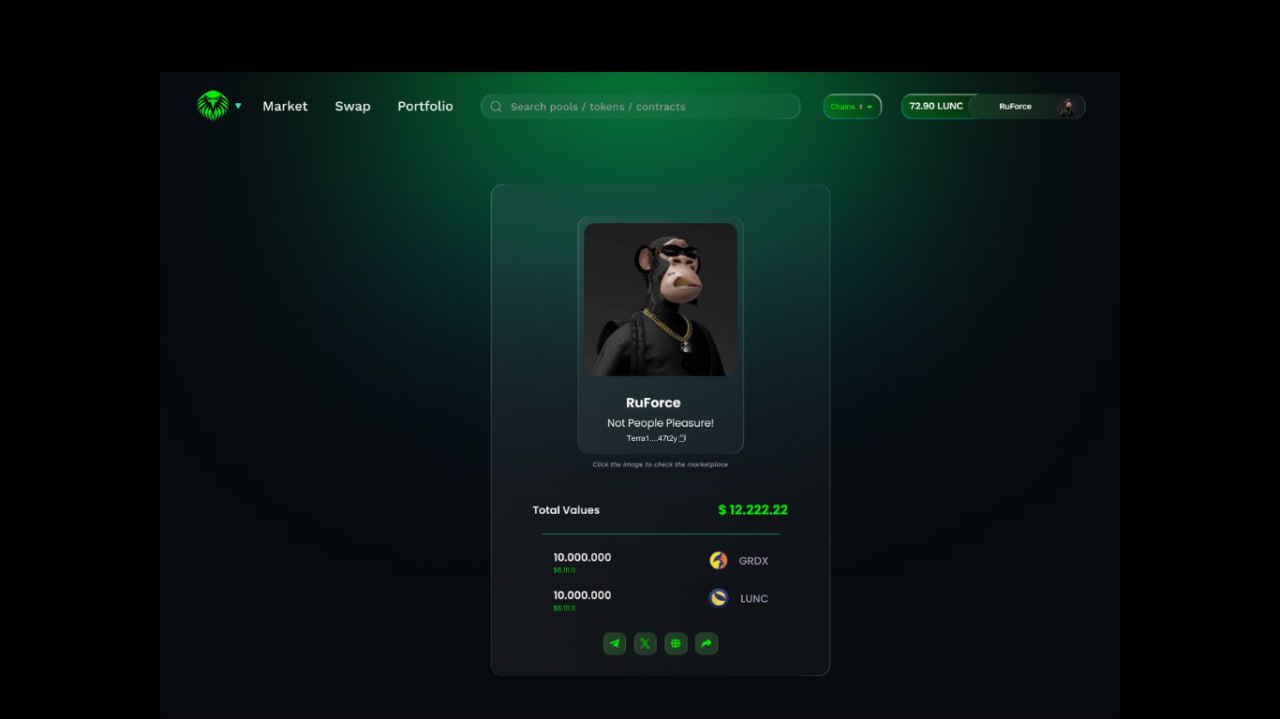
Garuda DeFi provide trader profile to define the NFT as your digital identity & stand out among traders.

<figure><img src="https://1287123956-files.gitbook.io/~/files/v0/b/gitbook-x-prod.appspot.com/o/spaces%2FtxjjcjzH1UYRlroVNUWJ%2Fuploads%2FQOq5ToF2AnxpCgi0TQg4%2FGiSweaNbIAA1rMI.jpg?alt=media&amp;token=979f46d2-49f2-424e-8503-e4107fcaa7b5" alt=""><figcaption><p>Trader Profile</p></figcaption></figure>

## How to customize my profile?

1. After connect wallet, click on your wallet and choose "profile"
2. Paste the NFT smart contract collection if you already have idle NFT\* on your wallet. (*\*NFT are not staking in smartcontract*)
3. Choose the NFT item from your NFT collection as your avatar.
4. &#x20;Paste marketplace link of your NFT Item (optional - if you want to promote your NFT item / collections )
5. Fill the username. must be max 10 letters without spacing
6. Fill the short description about you (optional)
7. Click save and sign on your wallet

{% hint style="danger" %}
Changes profile only allowed once per day
{% endhint %}

<div><figure><img src="https://1287123956-files.gitbook.io/~/files/v0/b/gitbook-x-prod.appspot.com/o/spaces%2FtxjjcjzH1UYRlroVNUWJ%2Fuploads%2FjTSOcUaiNbIjebvLM7li%2FFill.png?alt=media&amp;token=a6db40a9-e9af-4526-9967-1db78c644707" alt=""><figcaption></figcaption></figure> <figure><img src="https://1287123956-files.gitbook.io/~/files/v0/b/gitbook-x-prod.appspot.com/o/spaces%2FtxjjcjzH1UYRlroVNUWJ%2Fuploads%2FuO9KGk2xIzr9D2cbeVFc%2FSelect%20NFT%20(1).png?alt=media&amp;token=92cdd78d-e06b-4b62-8c6c-c5e57019a151" alt=""><figcaption></figcaption></figure></div>


# Airdrop Dapps

Introducing the **Airdrop DApp** on **Garuda DeFi** — the easiest way to distribute tokens at scale.\
No code. Just one click.

<figure><img src="https://1287123956-files.gitbook.io/~/files/v0/b/gitbook-x-prod.appspot.com/o/spaces%2FtxjjcjzH1UYRlroVNUWJ%2Fuploads%2FIDux8nLV8mgnia37lKiq%2Fphoto_2025-04-30_03-54-04.jpg?alt=media&amp;token=6cc7a527-a8da-4ed4-ad8d-f5a71a8b1f04" alt=""><figcaption><p>Trader Profile</p></figcaption></figure>

## How to use Airdrops Dapps?

1. Go to airdrops dapps on Garuda DeFi and connect wallet
2. Click New Task on Airdrop dapps page
3. Upload a CSV file as our standard operations (You may download and use our example template)
4. Review the data and confirm by continue to payment
5. Process the payment, as fees our platform use two optional token GRDX and FRG. Each command will spent 0.5 GRDX or 1 FRG (\~ $0.003) and gas fees 4 LUNC
6. If the transaction success there will be pop up the TX hash and notification

<figure><img src="https://1287123956-files.gitbook.io/~/files/v0/b/gitbook-x-prod.appspot.com/o/spaces%2FtxjjcjzH1UYRlroVNUWJ%2Fuploads%2FP5qzbJTTPaWN5OcmhDcG%2Fphoto_2025-04-30_04-07-40.jpg?alt=media&amp;token=0f0bf9b7-fc85-495d-8972-01b5fd44c97d" alt=""><figcaption><p>The flow to use airdrops dapps</p></figcaption></figure>

## Snapshot

For now, we only provide snapshot for delegator list by enter the validator operator address and click download button.&#x20;

<figure><img src="https://1287123956-files.gitbook.io/~/files/v0/b/gitbook-x-prod.appspot.com/o/spaces%2FtxjjcjzH1UYRlroVNUWJ%2Fuploads%2F1ZGZqVWkkkKTRS6nHX7R%2Fphoto_2025-04-30_04-10-59.jpg?alt=media&amp;token=de7a8d60-eb6b-41cc-866c-6cfcdb7b2e2d" alt=""><figcaption><p>Download delegator list</p></figcaption></figure>

{% hint style="danger" %}
I*f there any case the dapps execute transaction without sending airdrops, please reach us on* [*Telegram group*](https://t.me/Garudaverse99) *or* [*X account*](https://x.com/garuda_defi)*.*&#x20;
{% endhint %}


# Garuda on-ramp (upcoming)

Introducing the **Garuda On-ramp feature** on Garuda DeFi, buying USDC on Terra classic network directly using fiat with low fees. Powered by [Onramp.Money](https://onramp.money/)

<figure><img src="https://1287123956-files.gitbook.io/~/files/v0/b/gitbook-x-prod.appspot.com/o/spaces%2FtxjjcjzH1UYRlroVNUWJ%2Fuploads%2FnaEH4Gi7BfGp1DjJ8GZS%2FBlue%20Futuristic%20Business%20Roadmap%20Presentation%20-%202025-08-12T222212.849.png?alt=media&amp;token=02be0522-035c-438a-9930-3c1b5beec9b6" alt=""><figcaption></figcaption></figure>

## How to use Garuda On-ramp?

1. Connect your wallet on Garuda DeFi. Click Buy Crypto on your profile, then select the fiat currency you want to use. To see the full list of fiat currencies supported by Onramp.money, visit [this link](https://docs.onramp.money/onramp/supported-assets-and-fiat/fiat-currencies).

{% hint style="info" %}
For better experiences please use keplr wallet on your browser, as wallet browser didn't support third parties such as gmail login.
{% endhint %}

2. Enter the amount of USDC you want to purchase based on your selected fiat currency, then click the Buy button.
3. If this is your first time using Onramp.money, you will need to sign up and complete KYC verification. To learn how the KYC process works in each region, visit [this link](https://docs.onramp.money/onramp/kyc-tiers-for-users).
4. Once your KYC is approved, proceed with the payment. The available payment methods depend on your region. You can view the list [here](https://docs.onramp.money/onramp/supported-assets-and-fiat/payment-methods).
5. After your payment is successful, Onramp.money will send the purchased USDC to the Garuda protocol wallet on the Noble chain.
6. To redeem your USDC from the Garuda protocol wallet, enter the TX hash and Order ID in the Redeem tab. You can find these details in your successful transaction history on Onramp.money.
7. Once redeemed, the USDC from the Garuda protocol wallet will be sent to your Terra Classic wallet via IBC. (The transfer cost will be deducted from your USDC.)

{% embed url="<https://drive.google.com/file/d/1grpyanmFgDi3XEDqs9gjlcnkKx6XiJfM/view?usp=sharing>" %}

## Fees&#x20;

* $1 Blockchain fees
* 0.3% transaction for Onramp.money fees
* Payment gateway applied based on region [link](https://docs.onramp.money/onramp/payment-gateway-fees-and-limit)
* 1% transaction for platform fees (50% for development - 50% to buyback and burn $GRDX token)
* \~$0.105 USDC for transaction fees&#x20;


# GRDX Token

Data as January 06,2026

GRDX is the utility token on the Luna Classic network, making its debut in October 2023. It is designed to power core functions within the Garuda ecosystem (DeFi and NFT Marketplace)

GRDX is used as a utility payment token across the [Garuda DeFi](https://garuda-defi.org/) and [BigbangX](https://garuda-defi.org/) platform, enabling users to access features, services and protocol operations efficiently while supporting the sustainability of the ecosystem.

As Garuda DeFi and BigbangX continues to expand, GRDX plays a key role in driving on-chain activity and strengthening the platform’s utility layer.

<table><thead><tr><th width="140.39990234375">Property</th><th>Details</th></tr></thead><tbody><tr><td>Name</td><td>GarudaX Token</td></tr><tr><td>Symbol</td><td>GRDX</td></tr><tr><td>CA</td><td>terra12f3f5fzfzxckc0qlv3rmwwkjfhzevpwmx77345n0zuu2678vxf0sm6vvcw</td></tr><tr><td>Developer</td><td>Garuda Universe</td></tr><tr><td>Renounced</td><td>Yes</td></tr><tr><td>Genesis Total Supply</td><td>1,000,000,000 GRDX</td></tr><tr><td>Dev Burned</td><td>900,000,000 GRDX</td></tr><tr><td>Current Total Supply</td><td>94,321,307 GRDX as of January 06, 2026</td></tr><tr><td><a data-footnote-ref href="#user-content-fn-1">On-chain Burn</a></td><td>Yes</td></tr><tr><td>Off-chain burn</td><td>Yes</td></tr><tr><td>Tax Token</td><td>No</td></tr><tr><td>Utility</td><td>Native payment on Garuda DeFI and BigBangX NFT Markeplace</td></tr></tbody></table>

## Total Supply

Initially, the total supply of GRDX was 1 billion tokens. Following a strategic developer decision, the supply was reduced to 100 million to enhance scarcity, strengthen long-term value, and align the tokenomics with sustainable ecosystem growth.

## Renounced

The GRDX smart contract has been fully renounced, resulting in a trustless and immutable token structure. As a consequence, there is no administrative control or privileged access remaining within the contract. GRDX can no longer be minted, modified, or altered in any form, ensuring a fixed supply and eliminating the risk of centralized intervention. This design reinforces transparency, security, and long-term confidence in the GRDX token within the Garuda DeFi ecosystem.

## Projected Burn

GRDX is a deflationary utility token featuring **a dual burn mechanism** that reduces supply over time.

{% tabs %}
{% tab title="On-chain Burn" %}
The on-chain burn occurs when GRDX is used as a platform fee within Garuda DeFi, where 100% of the fee is automatically and permanently burned.
{% endtab %}

{% tab title="Off-chain Burn" %}
The off-chain burn is funded by Garuda DeFi and BigbangX performances, which will be used to buyback and burn GRDX token from open market :&#x20;

* 25% of factory fees (pool,token,farming and staking) from Garuda DeFi&#x20;
* 2.5% of protocol fees from DEX trading&#x20;
* 25% of marketplace fees from BigbangX&#x20;
  {% endtab %}
  {% endtabs %}

This dual mechanism directly links GRDX scarcity to platform usage and trading activity, supporting long-term ecosystem sustainability.

## Liquidity Projection

Liquidity Projection plays a key role in supporting the long-term liquidity stability of the GRDX token within the Garuda DeFi ecosystem. A portion of ecosystem revenue is allocated to buyback activities and to strengthen GRDX liquidity, helping maintain market depth and reduce excessive volatility.

Liquidity reinforcement is sourced from:

* **25% of Factory Fees** including fees generated from pools, token utilities, farming, and staking
* **2.5% of Protocol Fees** derived from DEX trading activity
* **25% of Marketplace Fees** originating from the BigBangX ecosystem

These allocations are deployed in a measured manner to enhance liquidity across core trading pairs and support a sustainable liquidity profile for GRDX.

## 2026 Tokenomic&#x20;

*Updated as of January 06, 2026*

<figure><img src="https://1287123956-files.gitbook.io/~/files/v0/b/gitbook-x-prod.appspot.com/o/spaces%2FtxjjcjzH1UYRlroVNUWJ%2Fuploads%2F8eXcFhAAVKZVkWK3k38r%2FBlue%20Futuristic%20Business%20Roadmap%20Presentation%20-%202026-01-06T191035.754.png?alt=media&amp;token=9ed545a1-b863-4bd1-b65f-f87a2db4bbbf" alt=""><figcaption></figcaption></figure>

### Staking Rewards Tokenomic 2026

<figure><img src="https://1287123956-files.gitbook.io/~/files/v0/b/gitbook-x-prod.appspot.com/o/spaces%2FtxjjcjzH1UYRlroVNUWJ%2Fuploads%2FM2bPLi1R7k2eaWLkqWXB%2FBlue%20Futuristic%20Business%20Roadmap%20Presentation%20-%202026-01-07T175735.970.png?alt=media&amp;token=2fdb31d6-166d-4b1a-ae2a-26be638e0d4a" alt=""><figcaption></figcaption></figure>

The GRDX staking rewards tokenomic 2026 framework is designed to balance ecosystem sustainability with market stability. By maintaining a controlled reward distribution, the protocol helps mitigate excessive sell-pressure which can negatively impact token price dynamics and liquidity conditions.

* Initial Total Rewards provided : 2,500,000 GRDX
* Each phase deploys 20% = 500,000 GRDX
* If rewards for every phase finished, APR will be drops by 50% and the next 500,000 GRDX is deployed for the new phase

A measured reward schedule also encourages participants to transition toward farming-based incentives, where rewards are tied to productive liquidity contributions rather than passive holding. This approach supports deeper liquidity, strengthens protocol utility, and aligns long-term incentives between token holders and the broader Garuda DeFi ecosystem.

## GRDX 2026 Roadmap

The 2026 roadmap outlines the strategic development phases of the GRDX ecosystem across four quarters.&#x20;

<figure><img src="https://1287123956-files.gitbook.io/~/files/v0/b/gitbook-x-prod.appspot.com/o/spaces%2FtxjjcjzH1UYRlroVNUWJ%2Fuploads%2Fk84jxPUEdCwIoPBfG8K4%2FBlue%20Futuristic%20Business%20Roadmap%20Presentation%20-%202026-01-08T095711.746.png?alt=media&amp;token=6d643fe7-9fc8-4735-9fa2-6d89031d2881" alt=""><figcaption></figcaption></figure>

The plan focuses on strengthening tokenomics, expanding cross-chain presence, and increasing ecosystem utility. Key milestones include the launch of the new tokenomics framework and Osmosis deployment in Q1, followed by the introduction of the BigBangX launchpad in Q2. In Q3, the roadmap prioritizes the expansion of Garuda DeFi to Solana along with the GRDX re-launch on the network. The year concludes in Q4 with a targeted CEX listing to enhance market accessibility and liquidity.

[^1]: A mechanism when users use GRDX as the platform fee on Garuda DeFi, 100% of the tokens are automatically and permanently burned


# Governance

Garuda DeFi is governed by the community through a decentralized governance system powered by $**GDEX**.&#x20;

By staking $GDEX, users become active participants in the ecosystem, not just passive holders.

Stakers enjoy [**DEX revenue shares**](/products/earning/gdex-shares#how-to-earn-trading-fee-shares-from-gdex) while gaining the right to **propose, vote, and decide** on key initiatives that drive the growth and performance of Garuda DeFi.&#x20;

From protocol upgrades and liquidity strategies to treasury management and ecosystem expansion, every major decision is shaped by the community.

<figure><img src="https://1287123956-files.gitbook.io/~/files/v0/b/gitbook-x-prod.appspot.com/o/spaces%2FtxjjcjzH1UYRlroVNUWJ%2Fuploads%2Fg657AEukxxXPnYyY1BUA%2FBlue%20Futuristic%20Business%20Roadmap%20Presentation%20-%202025-12-31T221708.754.png?alt=media&amp;token=d4837b84-6595-49af-869e-7d935b1b73d3" alt=""><figcaption></figcaption></figure>

## How GDEX Governance Works?

1. Go to <https://garuda-defi.org/governance>
2. To participate in governance, users must become members by [staking $GDEX](https://garuda-defi.org/cross-staking/terra1dttut659lxn35m7elu794rglzjzmph3a7v8cs6866qn0csa05u7sk0jg3s/assets) on the Garuda DeFi cross-staking platform.
3. Vote on proposals that are currently live for voting.
4. Each member’s voting power is determined by the percentage of **$GDEX** they have staked.
5. After the voting period ends, the proposal result can be finalized and moved to the next stage (except for vetoed proposals).
6. If the majority votes **Yes**, the proposal is approved and finalized into **time-lock mode**.&#x20;
7. During the time-lock period, the Guardian (Garuda Development Team) will conduct a security review of the code for every approved proposal, especially those involving migrations or execution messages.
8. After the time-lock period ends, the approved proposal can be executed by any members.

## How to create a proposal on Garuda DeFi?

1. Any member who stakes **GDEX** is eligible to create a proposal.
2. To submit a proposal, the user must deposit **1,000 $GRDX** tokens.&#x20;
3. Please note that if a proposal is **vetoed**, the deposit will be **burned**
4. If the proposal is **rejected or approved**, the deposit will be **returned** to the proposal creator after it finalized before time-lock mode.


# Garuda DeFi Roadmap

2026 Roadmap (Last updated: 26 March 2026)

<figure><img src="https://1287123956-files.gitbook.io/~/files/v0/b/gitbook-x-prod.appspot.com/o/spaces%2FtxjjcjzH1UYRlroVNUWJ%2Fuploads%2FJDLMs5IiQcwhcQFhg052%2Fphoto_2026-03-26_12-35-46.jpg?alt=media&amp;token=aa3828f7-036d-4e97-94d7-fa10ea4266b2" alt=""><figcaption></figcaption></figure>

##


# GSOL DEX

Decentralized spot and perpetual exchange on Solana

## Solana Expansion

To continue expanding the ecosystem and unlock greater opportunities for growth,\
Garuda DeFi is preparing to expand its decentralized exchange platform to the Solana.

{% hint style="info" %}
*This expansion does not aim to abandon the Terra Classic ecosystem. On the*\
*contrary, the objective is to strengthen the Layer-2 ecosystem, particularly the GRDX*\
*and GDEX tokens, by creating new utilities and cross-ecosystem value flows between*\
*Terra Classic and Solana.*
{% endhint %}

## GSOL – Garuda Solana Platform

GSOL is a decentralized spot and perpetual exchange on Solana blockchain. It supports perpetual trades with up to 100x leverage and token swaps + orderbook + aggregrat route with low price impact and depth liquidity. GSOL will uses Pyth as data stream oracles with Chainlink as fallback for accurate pricing, so liquidations occur only at fair market prices, not at momentary spread spikes.

Perpetual trading is powered by [GLV](/gsol-dex/glv-liquidity-pool) (Garuda Liquidity Vault) pools. GSOL routes every order against these pools and quotes the oracle index price rather than relying on an order book or external market makers. Liquidity providers earn 70% of the fees generated from trading, liquidations and borrowing fees.

## GSOL DEX Features Overview

GSOL DEX on Solana is designed as a comprehensive trading ecosystem centered around two core primitives: Spot Trading and Perpetual Trading.

<figure><img src="https://1287123956-files.gitbook.io/~/files/v0/b/gitbook-x-prod.appspot.com/o/spaces%2FtxjjcjzH1UYRlroVNUWJ%2Fuploads%2FxXXaDsx5Yk5EVk0cG9Wm%2FChatGPT%20Image%20May%208%2C%202026%2C%2011_45_58%20AMx.png?alt=media&amp;token=986862ce-699a-42e1-9797-8ca9e9c38012" alt=""><figcaption></figcaption></figure>

**The Spot Trading** module integrates both order book and smart swap (AMM) mechanisms, enhanced by an internal routing system and aggregator to ensure optimal pricing, deep liquidity, and efficient trade execution.

**The Perpetual DEX** introduces a fully on-chain derivatives trading experience powered by a risk engine, keeper system, and dynamic trading fees, enabling sustainable leverage trading with real-time risk management.

Beyond its core trading infrastructure, GSOL DEX expands its ecosystem through top features:

* [Permissionless Perpetual Markets](/gsol-dex/create-perpetual-market) allowing anyone to create and list new perpetual trading pairs, driving open and scalable market expansion
* Copy Trading, automate copy top traders strategies in only one click
* Trading & Marketing Incentives, including Trade-to-Earn and Refer-to-Earn programs to drive user growth and volume
* Booster for Trading & Liquidity, featuring a Leaderboard system to reward top traders and liquidity providers
* Unified Vault, one secure global vault powered by [GLV](/gsol-dex/glv-liquidity-pool) (Garuda Liquidity Vault) to routes every order and quotes the oracle index price rather than relying on an order book or external market makers
* Isolated Margin to enhance security by limiting risk to each individual position, while also preventing funds from being concentrated in a single deposit contract, reducing overall systemic risk.
* Supports perpetual trading with up to 100x leverage, allowing users to maximize capital efficiency and amplify their trading exposure.
* A [layered risk engine](/gsol-dex/glv-liquidity-pool#risk-engine) to protect the vault from excessive exposure and maintain balanced, stable trading conditions.

Together, these components position GSOL DEX as a modular, scalable, and permissionless DeFi hub on Solana.

## Get Started

Choose your role to find the right starting point.

* **Token holders:** [GSOL](/gsol-dex/gsol-tokenomic#gsol-token) — Stake GSOL to earn trading fees.
* **Traders:** [Trading on GSOL](/gsol-dex/trading-on-gsol)— Open leveraged positions, place limit orders, and swap tokens.
* **Liquidity providers:** [Providing liquidity](/gsol-dex/glv-liquidity-pool) — Earn yield by depositing into GLV pools.
* **Market Creator:** [Permisionless perps](/gsol-dex/create-perpetual-market) — Run your own perps market, control risk, liquidity and capture trading revenue.


# GSOL Tokenomic

## GSOL Token

GSOL is the platform's utility and governance token. Staking GSOL earns you a share of protocol fees  from leverage trading, liquidations, borrowing fees, and swaps are used to buy back GSOL.  GSOL also grants voting power in protocol governance.

## Buying GSOL

GSOL trading is not live yet. We are currently conducting a [private sale](#private-sale-nft-program) and [presale](#gsol-presale) to raise funds for development and to bootstrap initial liquidity ahead of the GSOL DEX launch.

## GSOL Staking

Staking GSOL will earns you a share of protocol fee buybacks :&#x20;

* 50% of protocol fees from swap&#x20;
* 100% of protocol fees from orderbook and aggregrat route&#x20;
* and dynamic percentage of ptotocol fees from leverage trading, liquidations and borrowing fees&#x20;

are used to buy back GSOL token on the open market through.

## Tokenomic

GSOL has a maximum supply of 200,000,000 tokens with no future minting, ensuring a fixed and transparent supply model.

The token distribution is structured to balance liquidity, ecosystem expansion, and long-term sustainability.

<figure><img src="https://1287123956-files.gitbook.io/~/files/v0/b/gitbook-x-prod.appspot.com/o/spaces%2FtxjjcjzH1UYRlroVNUWJ%2Fuploads%2FseQbgUA1LrKpRHwq4ZsA%2FChatGPT%20Image%20May%2027%2C%202026%2C%2005_03_54%20PM.png?alt=media&amp;token=48468b26-0076-46f3-bab4-5d0b24796b47" alt=""><figcaption></figcaption></figure>

77.5% of the total supply will enter circulation, consisting of:

* 42.55% — GSOL Presale
* 4.95% — GSOL Private Sale
* 15% — Liquidity
* 15% — Ecosystem Rewards

The remaining 22.5% of the supply is permanently allocated for long-term ecosystem support, including:

* 10% — GDEX Shares *(trading fee distributions for GDEX stakers)*
* 5% — GRDX Buyback & Burn Programs
* 5% — Developer Allocation *(team & ecosystem development)*
* 2.5% — DAO Treasury *(platform growth & ecosystem expansion)*

This allocation model is designed to support healthy market liquidity, community incentives, protocol growth, and sustainable value creation across the Garuda ecosystem.

## Private Sale NFT Program

The GSOL private sale already conducted through a limited NFT listing on Terraclassic chain.

**Private Sale Details**

* Allocation : 4,95% of total supply (9,900,000 GSOL)
* Starting Price : $0.0015
* Duration : 2 months
* Platform : [BigbangX](https://www.bigbangx.io/collection/gsol-private-sale-w9n9z)

Tokens obtained through the private sale NFT will follow the same schedule as the\
presale :

* TGE (Token Generated Events) at September 2026
* 12-months vesting period (2 months cliff and 10 month linear vesting unlock 10%)
* APR reward of 10%

## GSOL Presale

The GSOL Presale will be conducted on the Solana blockchain starting in May 2026.

Presale Link:\
<https://gsol.dev/presale>

#### Presale Details

* Allocation: 42.55% of total supply (85,100,000 GSOL)
* Dynamic Pricing Model: Starting price $0.0015 per GSOL
* Price Increase Mechanism: GSOL price increases by 5% each time 10% of the total presale allocation is sold
* Presale Duration: 4 months
* TGE (Token Generation Event): 09/27/2026
* Vesting Period: 12 months
  * 2-month cliff (locking period)
  * First unlock at 11/27/2026
  * Followed by 10 months linear vesting
* APR Reward: 10%

#### Purchase Rules

* Minimum Purchase: $10 equivalent payable in SOL, USDC, USDT, WBTC, or ETH
* Maximum Purchase Limit: $10,000 per wallet per day

#### Referral Program

* First Purchase Bonus: Users making their first purchase using a referral code receive an additional 2.5% GSOL bonus.\
  *(Subsequent purchases follow normal allocation without bonus.)*
* Referral Eligibility: Referral codes can only be generated after completing a purchase.
* Self-Referral: Not allowed.
* Referral Rewards: For every eligible purchase made using a referral code, the referrer receives 2.5% of the GSOL amount purchased during the presale period.


# Trading on GSOL

## Trading overview

GSOL is a decentralized exchange on Solana blockchain that lets you trade without a username or password. The platform uses oracle-based pricing sourced from [Pyth](https://www.pyth.network/) and use [Chainlink](https://chain.link/) as fallback , which reduces the risk of liquidations from temporary wicks.

## Positions and Orders

GSOL perpetual markets operate using a vault-based model, where traders open positions against a shared liquidity pool instead of matching directly with other traders.

Each position is defined by:

* **Collateral (Margin):** The capital deposited by the trader
* **Position Size:** The total exposure derived from collateral and leverage
* **Leverage:** Multiplier applied to collateral to increase exposure
* **Direction:**
  * **Long** — profit from price increase
  * **Short** — profit from price decrease

Profit and loss (PnL) is calculated using a linear model, meaning it is proportional to the position size and price movement.

### Pricing Model

GSOL uses an oracle-based pricing mechanism instead of an orderbook.

* Prices are derived from external oracle feeds
* A price range is used to ensure fair execution and reduce manipulation
* A mark price (average) is used for display and internal calculations

Execution prices depend on position direction to maintain fairness and system integrity

### Order Types

GSOL supports multiple order types to provide flexible trading strategies:

* **Market Order**\
  Executes immediately at the current oracle price
* **Limit Order**\
  Executes when the oracle price reaches a specified level
* **Stop Market Order**\
  Triggers a position when a defined price threshold is reached
* **Take-Profit / Stop-Loss (TP/SL)**\
  Automatically closes positions to lock in profit or limit losses
* **TWAP (Time-Weighted Average Price)**\
  Splits large orders into smaller parts executed over time to reduce price impact

### Execution Model

GSOL does not rely on a traditional orderbook.

* Orders are triggered by oracle price conditions
* Execution is performed by keepers (off-chain executors)
* There is no queue priority or passive matching system

This ensures consistent execution even in low-liquidity conditions.

### Position Management

Traders can:

* Increase or decrease position size
* Add or remove collateral
* Set multiple TP/SL conditions
* Partially or fully close positions

PnL is realized upon closing a position and includes all applicable fees and price impact.

### Risk Considerations

* Execution is not guaranteed for trigger-based orders during extreme volatility
* Price movements may skip trigger levels due to oracle updates
* Leverage and collateral directly affect liquidation risk


# Trading Fees

GSOL charges a fee when opening and closing positions. This fee is calculated based on the position size (not collateral) and may very depending on market conditions.

* Applied on both position increase and decrease
* Can be dynamic to manage risk and market imbalance

### Price Impact

Trades may incur a price impact adjustment depending on how they affect market balance.

* Trades that increase imbalance pay higher costs
* Trades that reduce imbalance receive better pricing

This mechanism helps maintain equilibrium between long and short positions.

### Funding Fees

GSOL uses a funding mechanism to balance open interest between longs and shorts.

* The dominant side pays the minority side
* Rates adjust dynamically based on market imbalance
* Encourages a balanced market over time

### Borrow Fees

A borrow fee may apply depending on pool utilization.

* Higher utilization → higher fees
* Designed to prevent excessive leverage and protect liquidity

### Liquidation Fees

When a position is liquidated:

* A liquidation fee is charged
* Used to cover execution costs and maintain system stability

### Fee Distribution

Fees generated by the platform are distributed to:

* Liquidity Providers (LPs) — as rewards for providing capital
* Protocol Treasury — for sustainability and growth


# Liquidations and ADL

This page covers liquidation mechanics, Auto-Deleveraging (ADL), and trading risks.

## What is Liquidation

Liquidation occurs when a trader’s position no longer has sufficient collateral to support its exposure.

This happens when the trader’s equity falls below the required maintenance threshold, putting the system and liquidity providers at risk.

### How Liquidation Works

* Each position has a liquidation price determined by:
  * collateral
  * leverage
  * fees and funding
* When this threshold is reached:
  * The position is force-closed
  * Remaining collateral is used to cover losses
* Liquidations are executed by keepers using oracle-based pricing

### Early Liquidation (Prevention Layer)

To reduce the risk of bad debt, GSOL may trigger early liquidation before a position becomes fully insolvent.

* Activated when equity approaches critical levels
* Closes positions earlier than the absolute liquidation point
* Ensures sufficient collateral remains to cover losses

This mechanism prioritizes system safety over maximum trader exposure

### Auto-Deleveraging (ADL)

In extreme market conditions, GSOL may activate Auto-Deleveraging (ADL) as a secondary protection layer.

* Triggered when:
  * trader profits become disproportionately large relative to vault liquidity
  * or system risk exceeds predefined thresholds
* The system will:
  * reduce or partially close profitable positions
  * rebalance exposure to protect the liquidity pool

ADL acts as a last-resort safeguard to maintain protocol solvency

### Liquidation Fees

When a position is liquidated:

* A liquidation fee is charged
* Used to:
  * incentivize keepers
  * support protocol stability


# GLV Liquidity Pool

## Overview

GSOL introduces a Global Liquidity Vault (GLV) as the core liquidity layer for perpetual trading.

Instead of fragmented liquidity across multiple pools, GSOL aggregates all liquidity into a single unified vault, which is dynamically allocated across supported perpetual markets (e.g., BTC, SOL, ETH).

This design ensures:

* Deep and consistent liquidity across all markets
* Efficient capital utilization
* Simplified liquidity provision for users

## How GLV Works

Users deposit assets into the GLV and receive a proportional share of the vault.

The GLV then allocates liquidity internally across different markets through a virtual allocation system.

```
User Deposit → GLV → Allocated to Markets (BTC / SOL / ETH)
```

Each market operates with its own internal accounting, allowing GSOL to manage exposure and risk independently while maintaining a single liquidity source.

## Liquidity Provider (LP) Incentives

Liquidity providers earn yield from multiple sources:

* Trading fees from perpetual positions
* Funding fees between traders
* Price impact fees from imbalanced trades

LP performance is directly influenced by trader PnL — LPs benefit when traders incur losses and vice versa.

## Risk & Allocation Model

GLV liquidity is distributed across markets using a combination of:

* Base allocation (predefined distribution per market)
* Dynamic adjustment (based on demand, volume, and risk conditions)

This ensures balanced exposure and prevents over-concentration in a single market.

## Risk Engine

GSOL integrates a multi-layered risk engine to protect liquidity providers and maintain system stability.

1. **Open Interest (OI) Cap**, Limits the total position size that can be opened per market.
2. **Funding Mechanism**, Balances long and short positions.
3. **Dynamic Fees (Price Impact)**, Adjusts trading costs based on market imbalance.
4. **Position Limits**, Restricts the maximum size per position.
5. **Reserve Factor**, Limits how much of the GLV can be used to back open positions.
6. **PnL Factor Cap**, Caps the impact of unrealized trader profits on vault valuation during deposits and withdrawals.
7. **Early Liquidation**, Triggers position closure before full insolvency.
8. **Auto-Deleveraging (ADL)**, A last-resort mechanism activated during extreme market conditions.
9. **Oracle-Based Pricing**, All positions and orders are executed using external oracle prices.
10. **Keeper-Based Execution**, Orders and liquidations are executed by decentralized keepers.


# Create Perpetual Market

### Overview

GSOL enables users to create permissionless perpetual markets, allowing anyone to launch a new trading pair backed by a dedicated liquidity vault.

Each market is configured with its own parameters and risk controls, ensuring flexibility while maintaining system safety.

<figure><img src="https://1287123956-files.gitbook.io/~/files/v0/b/gitbook-x-prod.appspot.com/o/spaces%2FtxjjcjzH1UYRlroVNUWJ%2Fuploads%2FwJC07aXV7qu8bAFgA4zI%2FMarket%20(23).png?alt=media&amp;token=30647361-db41-4909-ac12-e73f1229d4d1" alt=""><figcaption></figcaption></figure>

### Market Creation Flow

1. **Create Market Request**, A creator submits a request to launch a new perpetual market:

* Define trading pair (e.g., Asset / USDC)
* Specify base asset and collateral

2. **Oracle Validation**, The system validates pricing sources:

* Primary oracle: Pyth, Fallback oracle: Chainlink

If no reliable oracle is available:

* The market may use TWAP-based pricing (DEX)
* Only supported for verified assets with high-tier status

3. **Configure Market Parameters**, The creator defines core trading parameters enforced by the [GSOL risk engine](/gsol-dex/glv-liquidity-pool#risk-engine).
4. **Create Liquidity Vault (LV)**, A dedicated liquidity vault is created and deposited for the market:

* Supports approved assets (e.g., SOL, BTC, ETH, USDC, USDT)
* Acts as the counterparty to traders

5. **Minimum Liquidity Requirement**, to ensures sufficient depth for trading and prevents unstable or illiquid markets.
6. **Trading Activation**, Once conditions are met:

* The market goes live
* Traders can open positions against the vault

### Risk & Validation

All permission-less markets are subject to:

* Oracle validation or TWAP fallback
* Liquidity requirements
* Risk parameters (OI cap, leverage limits)

These safeguards ensure that even permission-less markets remain secure and sustainable.


# The Roadmap

## 2026 Roadmap

<figure><img src="https://1287123956-files.gitbook.io/~/files/v0/b/gitbook-x-prod.appspot.com/o/spaces%2FtxjjcjzH1UYRlroVNUWJ%2Fuploads%2FLx7l8D8ctufrp7hCe9zH%2FChatGPT%20Image%20May%208%2C%202026%2C%2005_23_21%20PM.png?alt=media&amp;token=f0b13245-1b76-4ebb-8dcb-d97ff1559c0a" alt=""><figcaption></figcaption></figure>

The GSOL development roadmap is structured into four key phases to ensure a secure, scalable, and progressive launch of the ecosystem.

* **Q1 — Foundation & Early Access**\
  The project begins with initial introduction and ecosystem awareness, followed by the GSOL private sale targeting early supporters and strategic participants.
* **Q2 — Presale & Core Development**\
  Focus shifts to the GSOL presale alongside active development of the core infrastructure, including testnet deployment and smart contract auditing process.
* **Q3 — TGE & Market Entry**\
  This phase includes final smart contract audits and the Token Generation Event (TGE), followed by GSOL listing on DEX and the launch of spot trading. Vesting begins with a 2-month cliff period.
* **Q4 — Perpetual DEX Launch**\
  GSOL expands into derivatives with the launch of the Perpetual DEX, including perp trading, permissionless market creation, and continued smart contract audits. Linear vesting begins (10% monthly unlock over 10 months).

This phased approach ensures strong security, scalable infrastructure, and a smooth transition from early access to a fully operational perpetual trading ecosystem.